

Scrum Team Performance is NOT a simple one-aspect, but a multi-aspect concept.
Imagine you want to compare two cars, saying which one is better.
To do so, you need to consider multiple parameters:
- Safety
- Fuel consumption
- Comfort
- Brand reputation
- Durability
- Environmental impact
- Cost of maintenance
- Build quality
- Design & Aesthetics
- And many more …
Be aware that your context and goals have a crucial role in the evaluation. For example, Americans generally prefer large cars, while Europeans prefer small cars.

Be aware that the Performance Evaluation
Is:
- Focused on outputs & impacts
- About triggering quality conversations
- About initiating the right improvements
- For collective interpretation
- For having meaningful insights
Is Not:
- Focused on utilization and efficiency
- Used for blaming people
- About comparing multiple Scrum Teams
Categories of Evaluation Criteria
Performance evaluation needs two main categories of criteria
Category 1: Quantitative Criteria
Category 2: Qualitative Criteria

Category 1: Quantitative Criteria
Five Categories of Quantitative Metrics
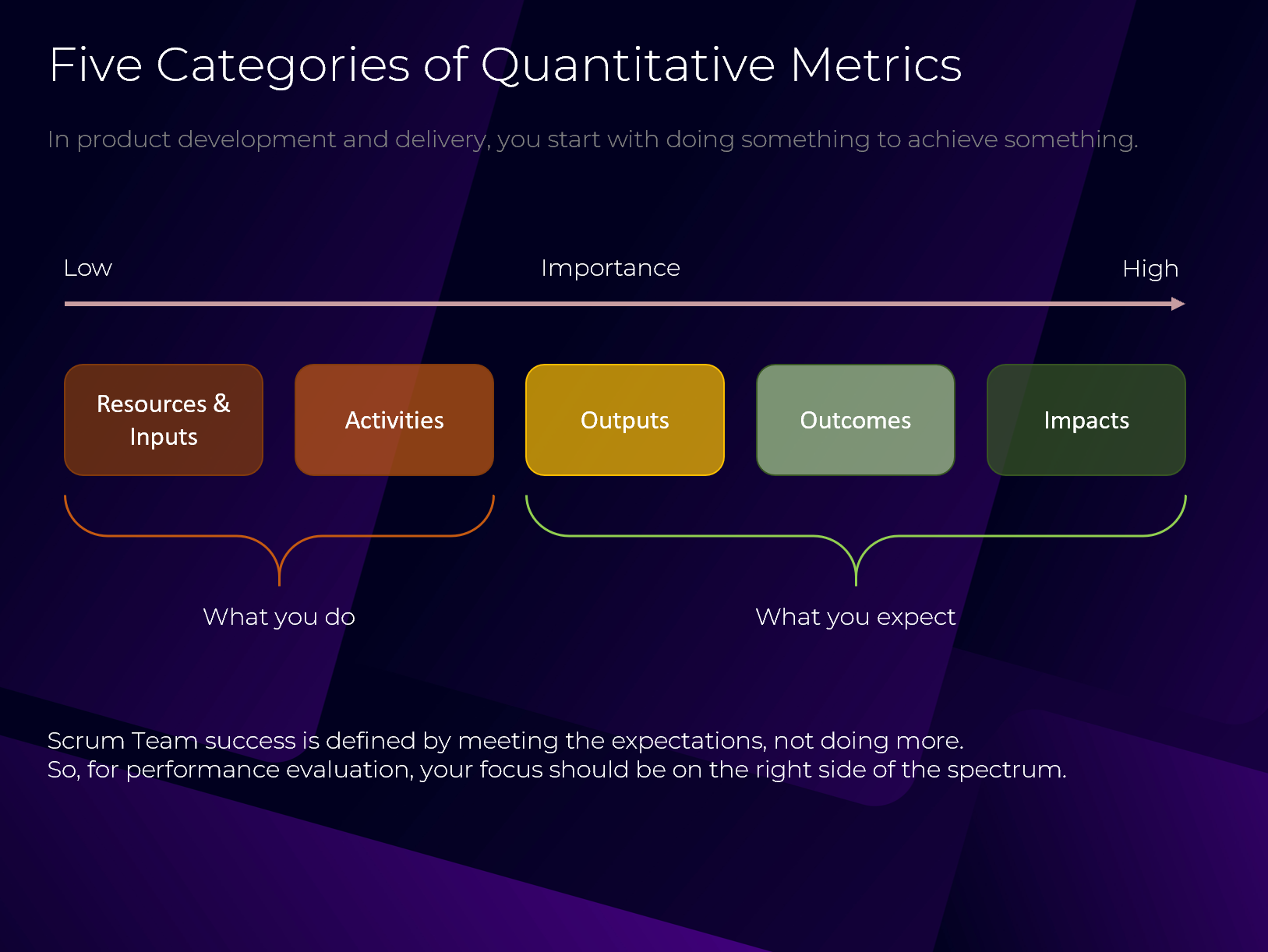
In product development and delivery, you start with doing something to achieve something. The five categories are:
- Impacts
- Outcomes
- Outputs
- Activities
- Resources & Inputs
Scrum Team success is defined by meeting the expectations, not doing more.
So, for performance evaluation, your focus should be on the right side of the spectrum.
Metrics Importance
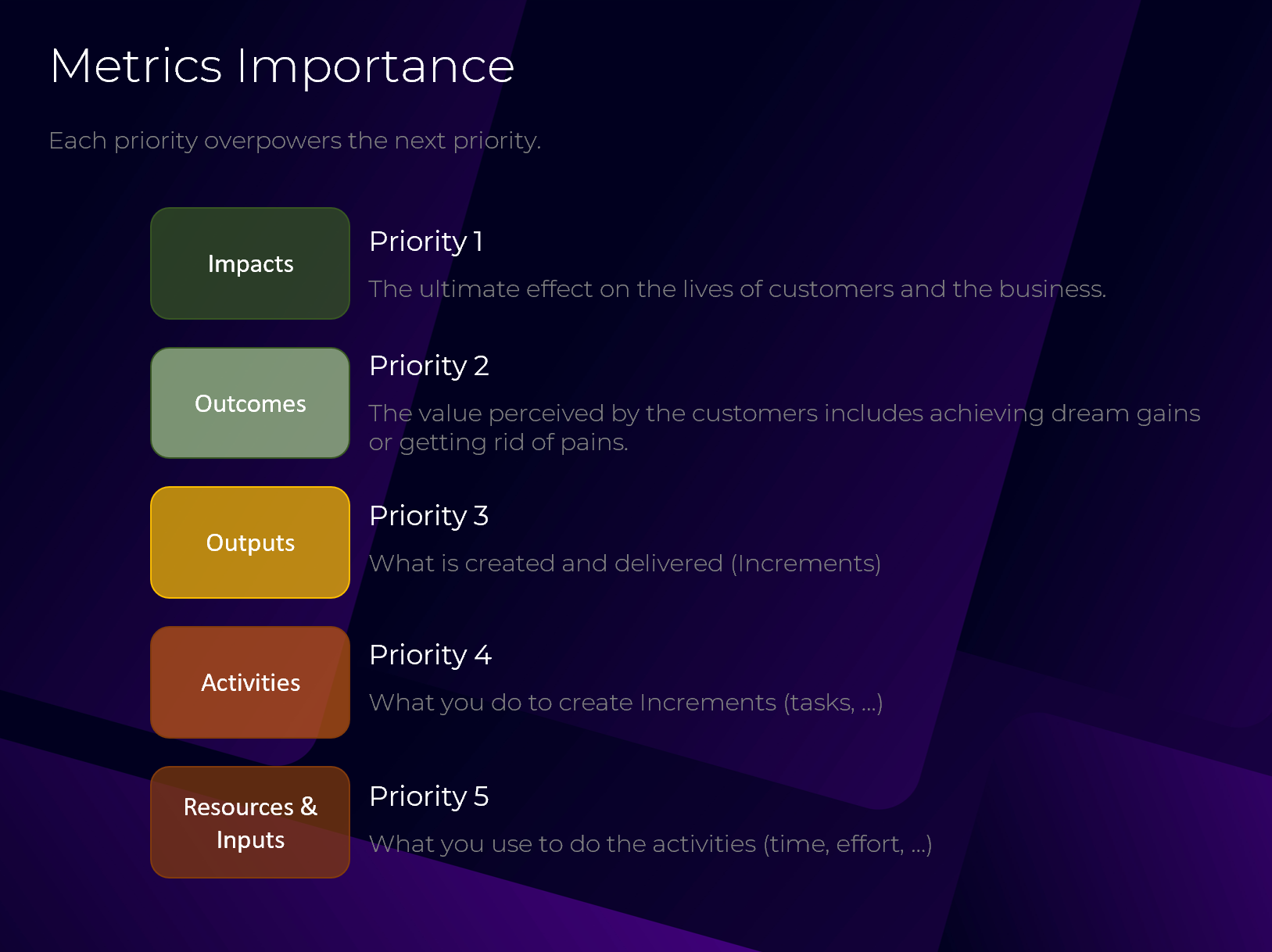
Each priority overpowers the next priority.
Priority 1
Impacts: The ultimate effect on the lives of customers and the business.
Priority 2
Outcomes: The value perceived by the customers includes achieving dream gains or getting rid of pains.
Priority 3
Outputs: What is created and delivered (Increments)
Priority 4
Activities: What you do to create Increments (tasks, …)
Priority 5
Resources & Inputs: What you use to do the activities (time, effort, …)
Metrics Specifications
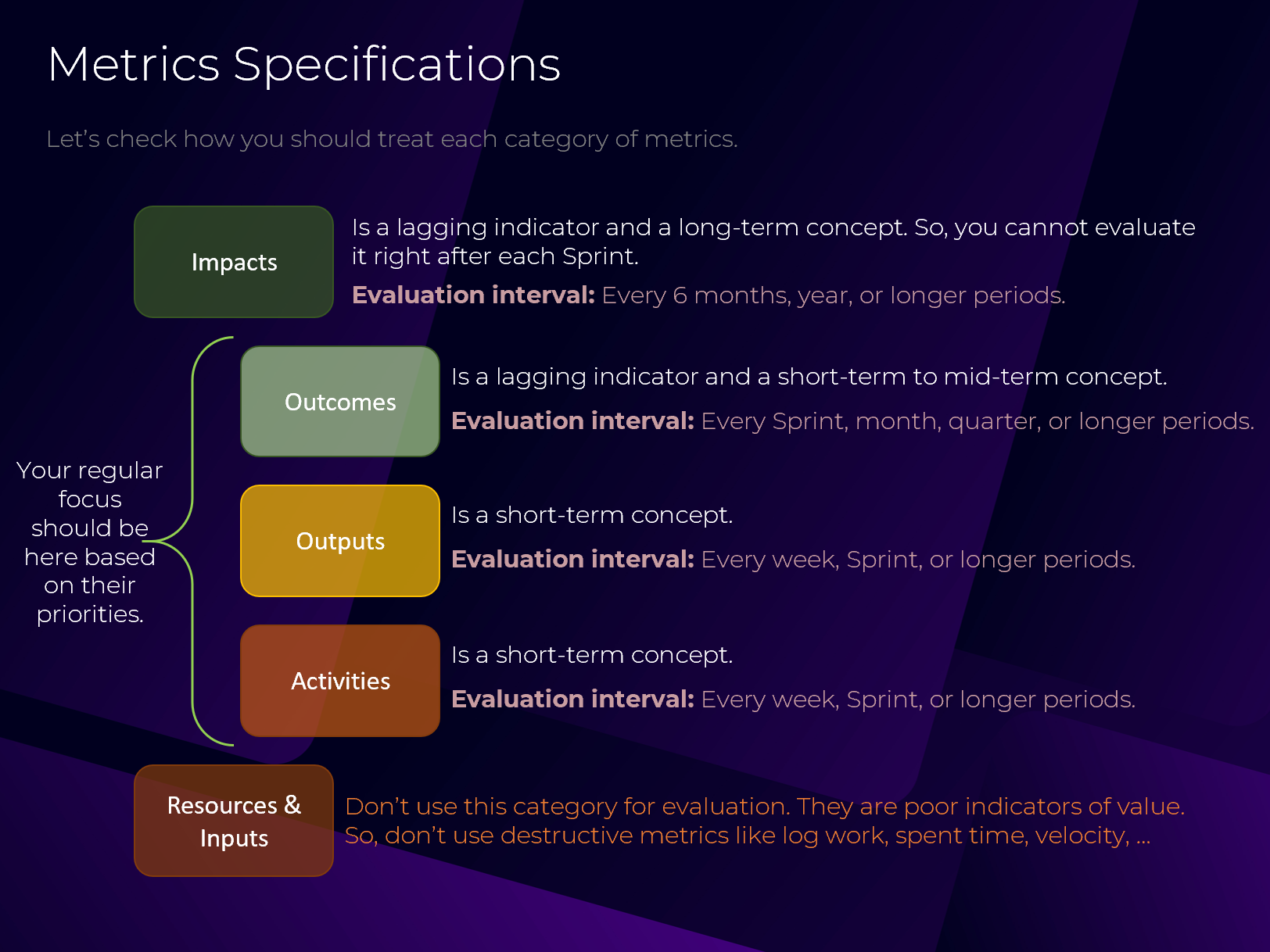
Let’s check how you should treat each category of metrics.
Impacts
Is a lagging indicator and a long-term concept. So, you cannot evaluate it right after each Sprint.
Evaluation interval: Every 6 months, year, or longer periods.
Outcomes
Is a lagging indicator and a short-term to mid-term concept.
Evaluation interval: Every Sprint, month, quarter, or longer periods.
Outputs
Is a short-term concept.
Evaluation interval: Every week, Sprint, or longer periods.
Activities
Is a short-term concept.
Evaluation interval: Every week, Sprint, or longer periods.
Resources & Inputs
Don’t use this category for evaluation. They are poor indicators of value.
So, don’t use destructive metrics like log work, spent time, velocity, …
*** Your regular focus should be on the Outcomes, Outputs, and Activities based on their priorities.
Case Study
MetaLearn
A double-sided learning platform that connects trainers with learners. Let’s define quantitative metrics for it.

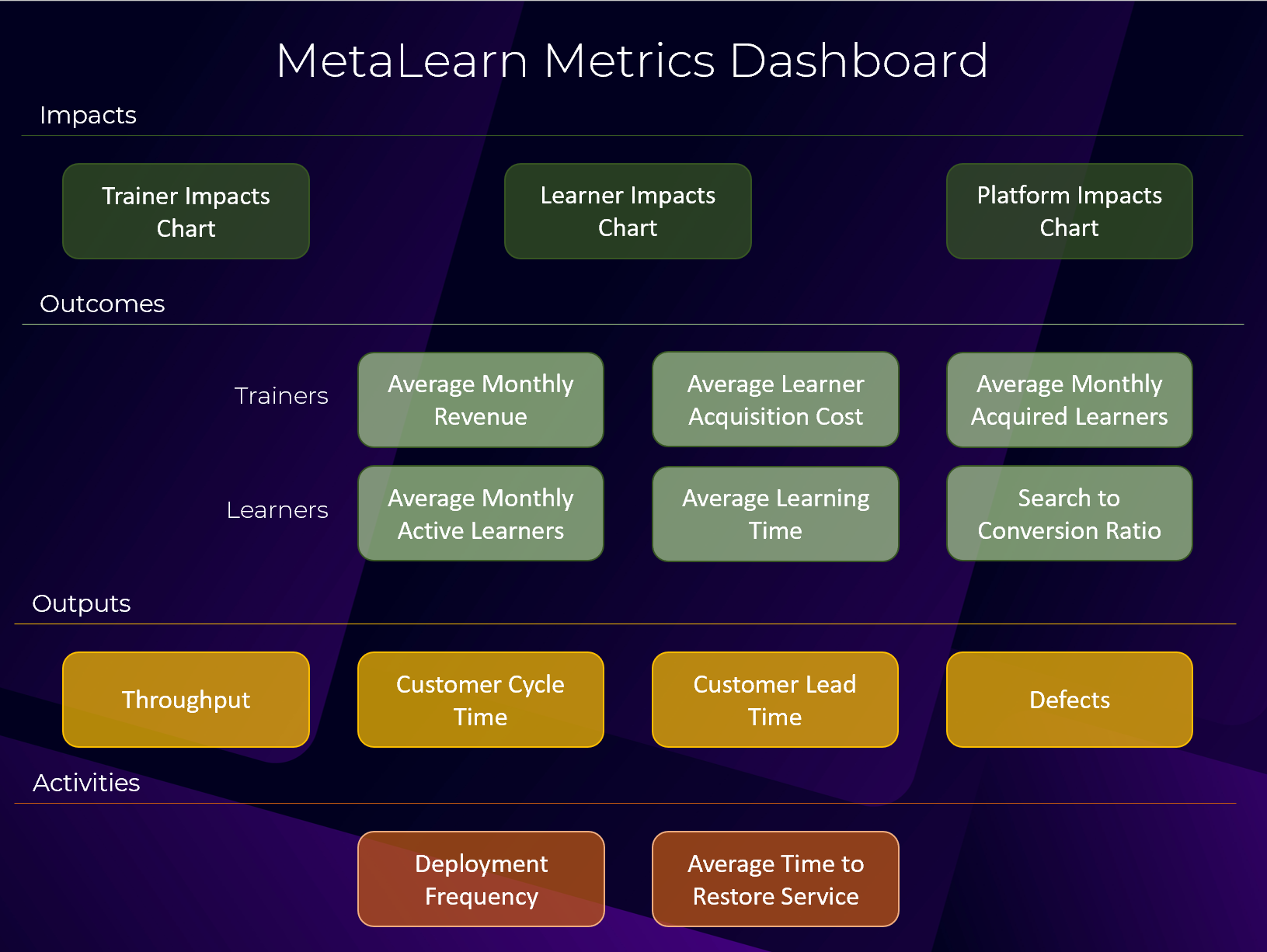
Impacts
The ultimate effect on the lives of customers and the business.
Impact for Trainers:
Building a sustainable training business.
Impact for Learners:
Growth over their professional life.
Impact for the MetaLearn Platform:
Becoming a thriving business that circulates the world’s knowledge.

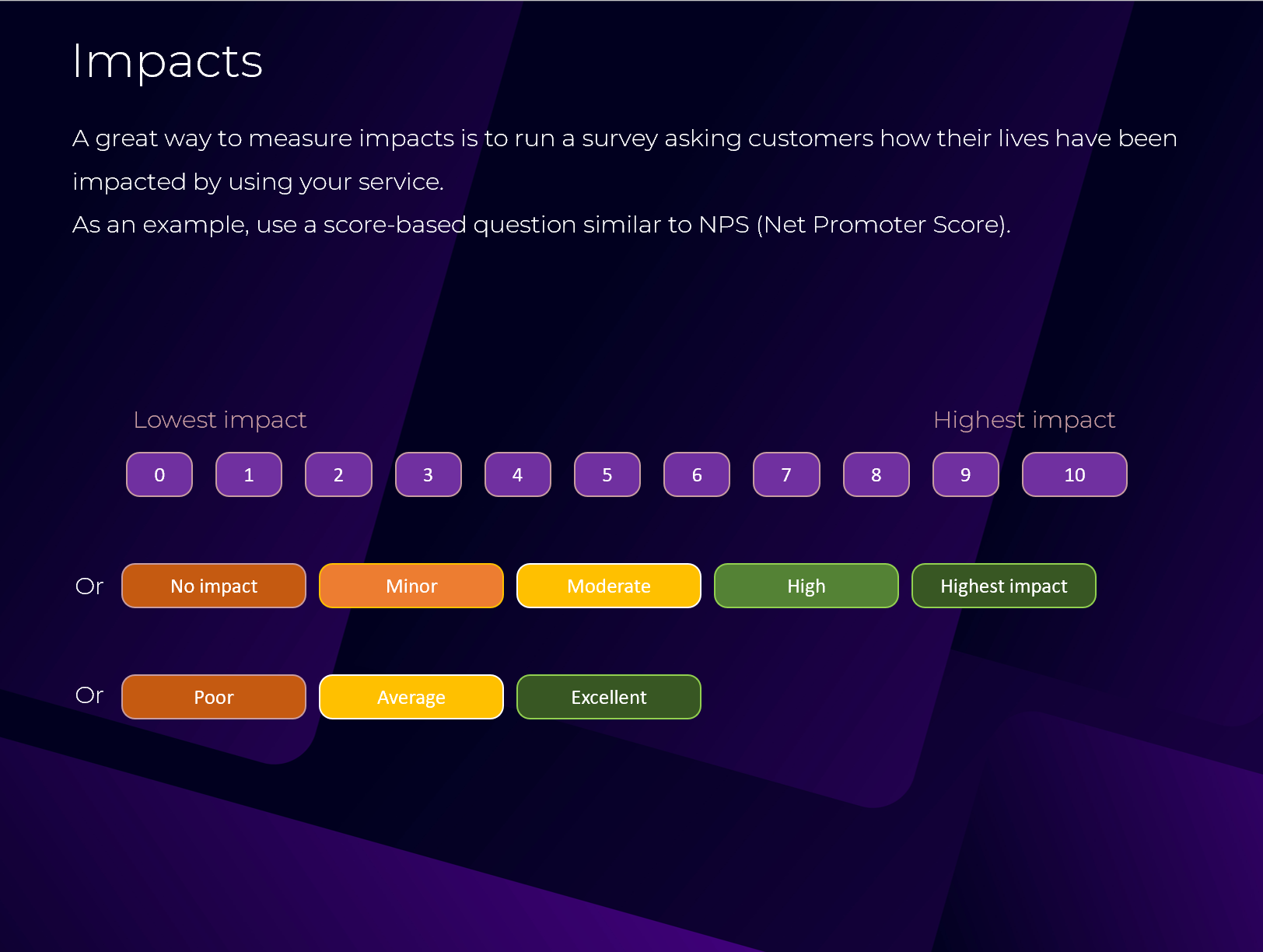
A great way to measure impacts is to run a survey asking customers how their lives have been impacted by using your service.
As an example, use a score-based question similar to NPS (Net Promoter Score).
Outcomes
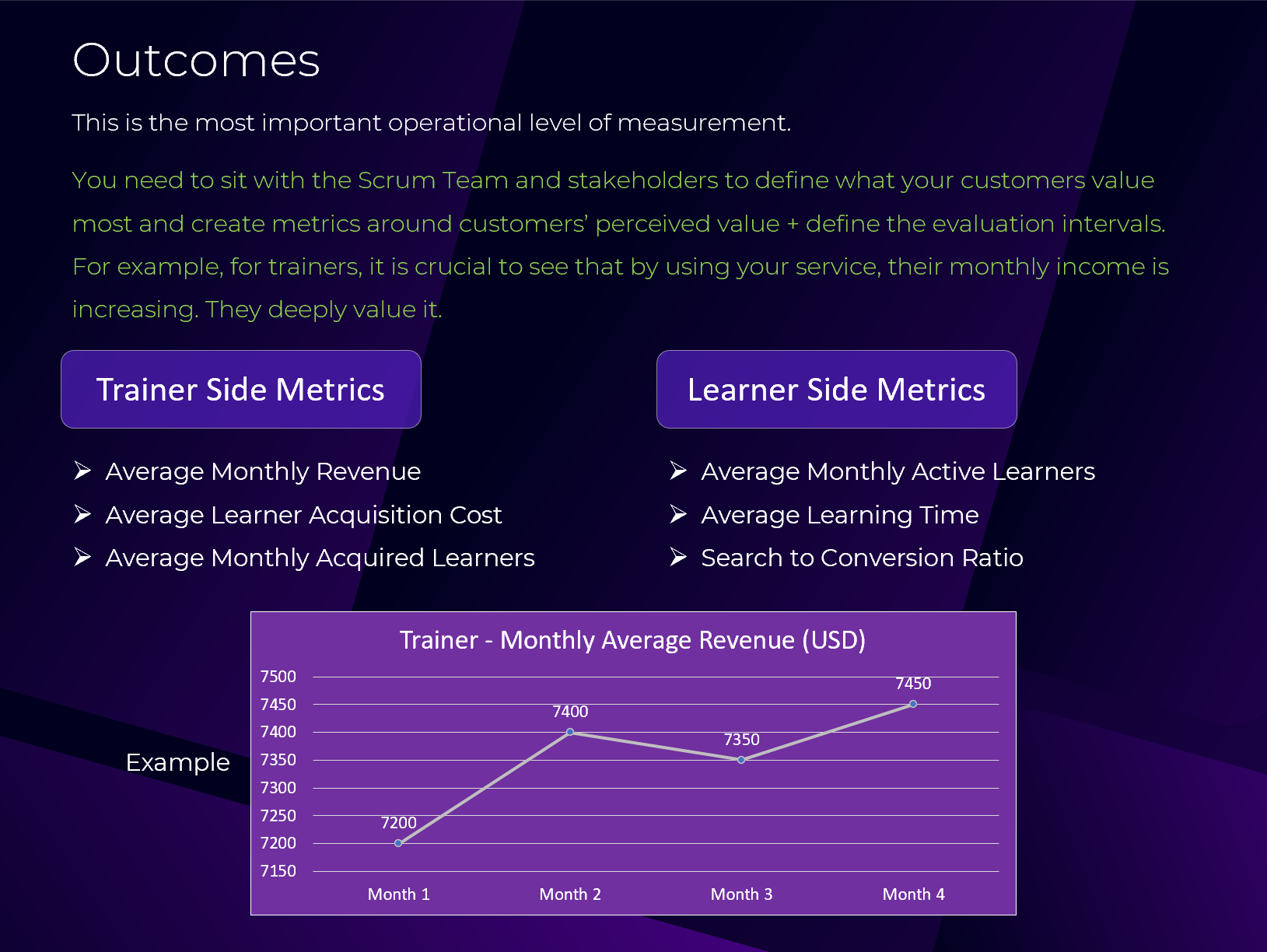
This is the most important operational level of measurement.
You need to sit with the Scrum Team and stakeholders to define what your customers value most and create metrics around customers’ perceived value + define the evaluation intervals.
For example, for trainers, it is crucial to see that by using your service, their monthly income is increasing. They deeply value it.
Trainer side metrics
- Average Monthly Revenue
- Average Learner Acquisition Cost
- Average Monthly Acquired Learners
Learner side metrics
- Average Monthly Active Learners
- Average Learning Time
- Search to Conversion Ratio
Outputs
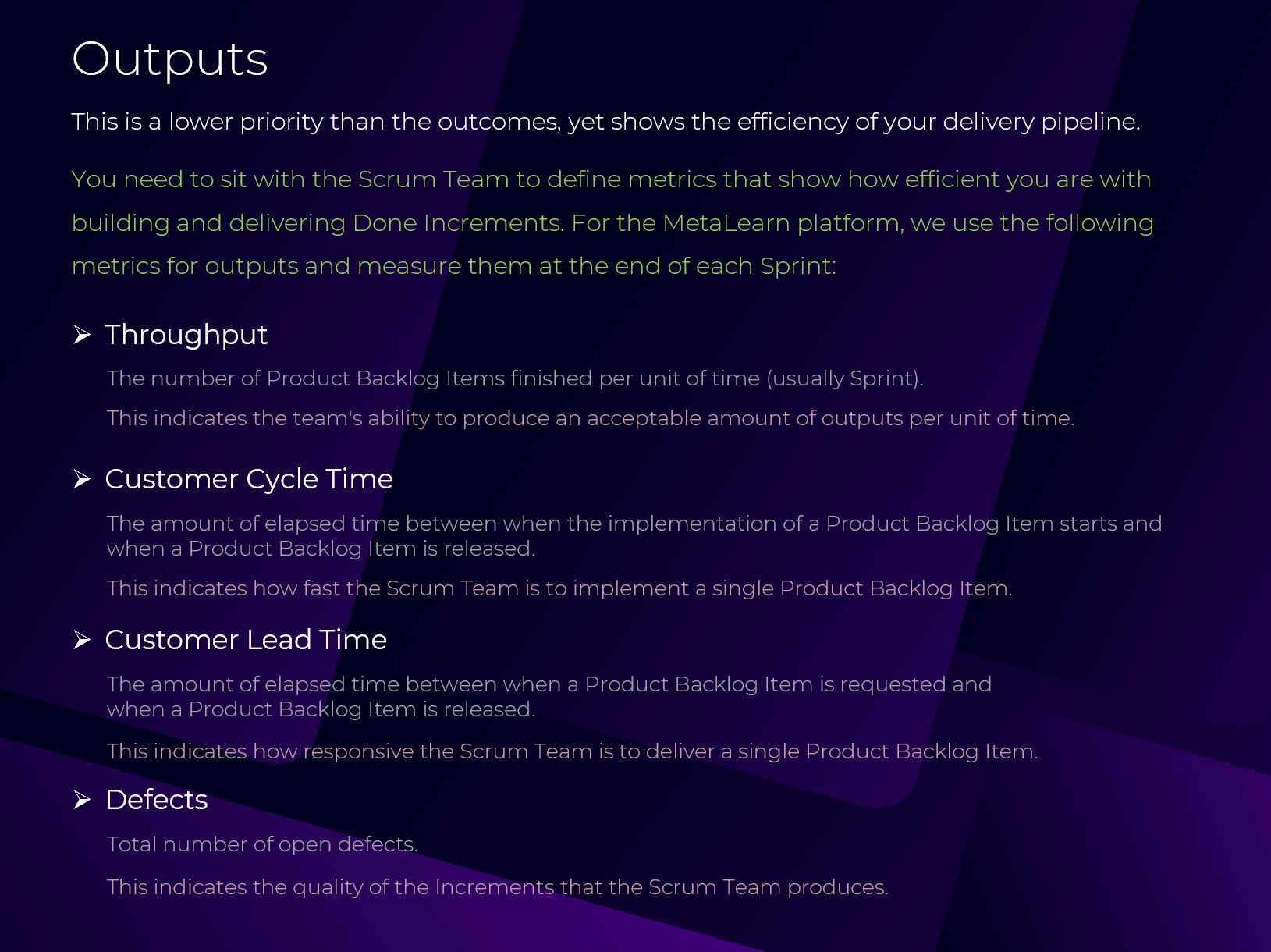
This is a lower priority than the outcomes, yet shows the efficiency of your delivery pipeline.
You need to sit with the Scrum Team to define metrics that show how efficient you are with building and delivering Done Increments. For the MetaLearn platform, we use the following metrics for outputs and measure them at the end of each Sprint:
Throughput
The number of Product Backlog Items finished per unit of time (usually Sprint).
This indicates the team's ability to produce an acceptable amount of outputs per unit of time.
Customer Cycle Time
The amount of elapsed time between when the implementation of a Product Backlog Item starts and when a Product Backlog Item is released.
This indicates how fast the Scrum Team is to implement a single Product Backlog Item.
Customer Lead Time
The amount of elapsed time between when a Product Backlog Item is requested and when a Product Backlog Item is released.
This indicates how responsive the Scrum Team is to deliver a single Product Backlog Item.
Defects
Total number of open defects.
This indicates the quality of the Increments that the Scrum Team produces.
Activities
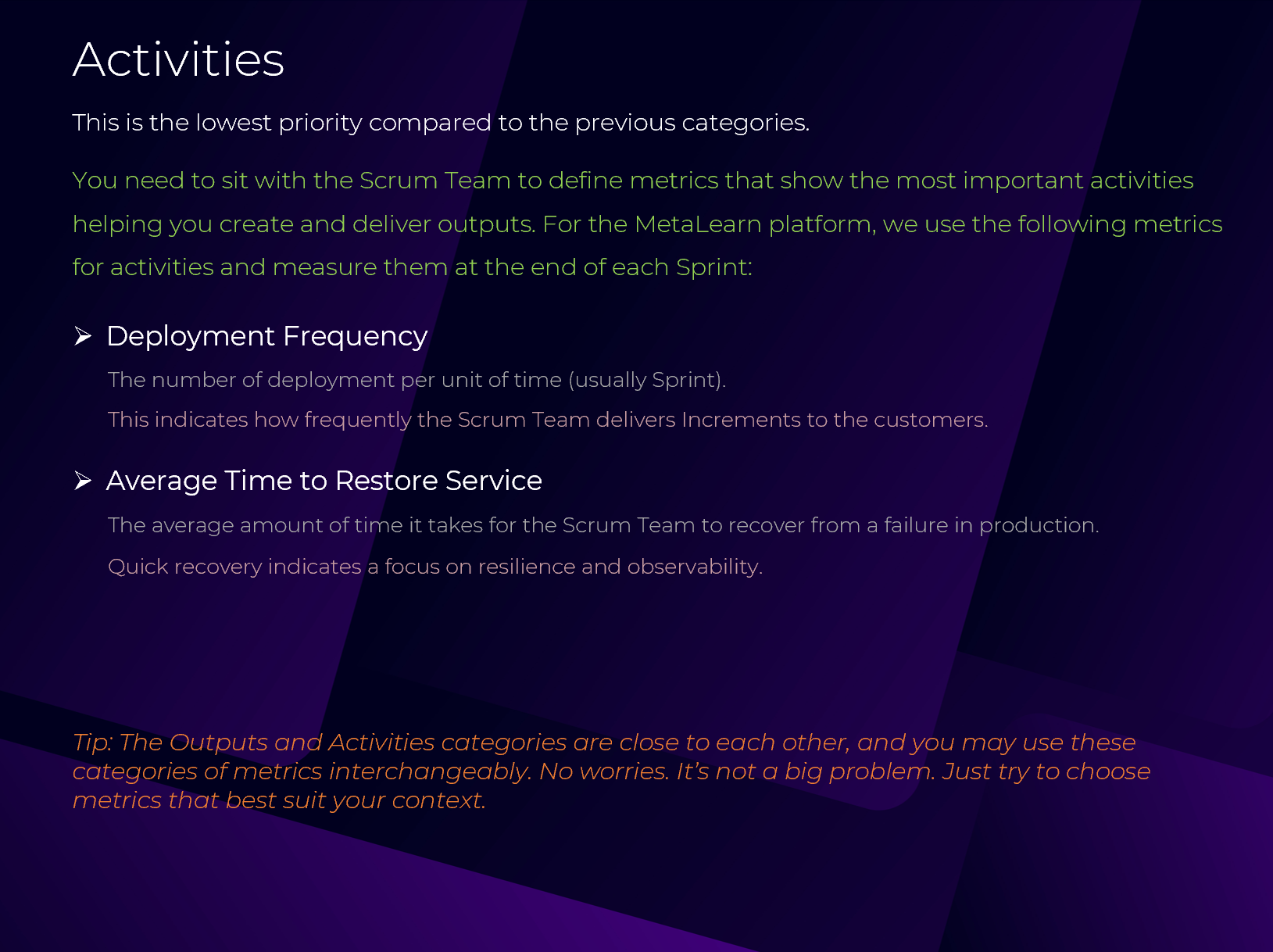
This is the lowest priority compared to the previous categories.
You need to sit with the Scrum Team to define metrics that show the most important activities helping you create and deliver outputs. For the MetaLearn platform, we use the following metrics for activities and measure them at the end of each Sprint:
Deployment Frequency
The number of deployments per unit of time (usually Sprint).
This indicates how frequently the Scrum Team delivers Increments to the customers.
Average Time to Restore Service
The average amount of time it takes for the Scrum Team to recover from a failure in production.
Quick recovery indicates a focus on resilience and observability.
Tip: The Outputs and Activities categories are close to each other, and you may use these categories of metrics interchangeably. No worries. It’s not a big problem. Just try to choose metrics that best suit your context.
MetaLearn Metrics Dashboard
Category 2: Qualitative Criteria
This category is more like a health check for the Scrum Team. At the end of each Sprint or month, you run a survey among the Scrum Team members. It is like a self-evaluation checklist as follows:
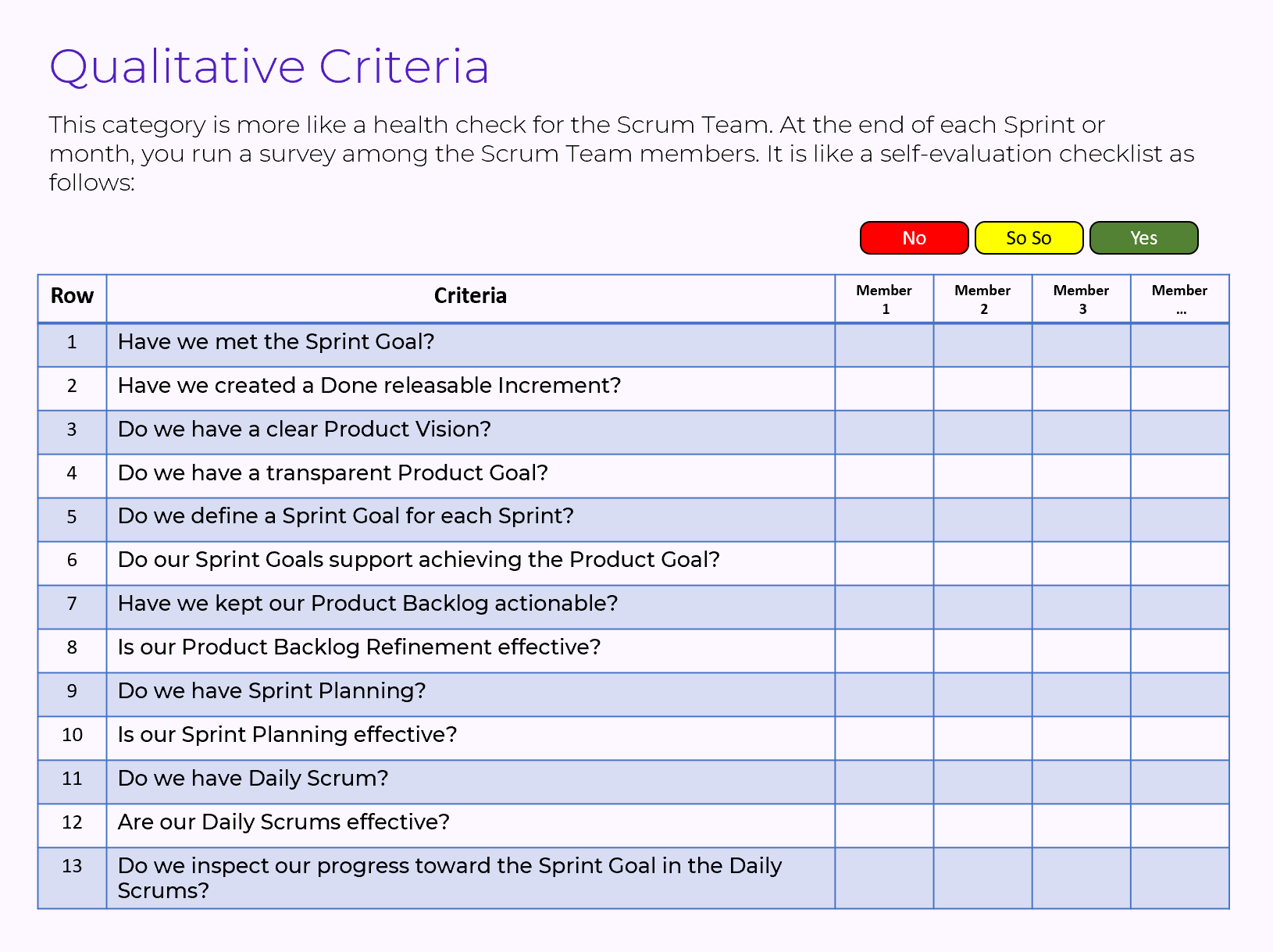
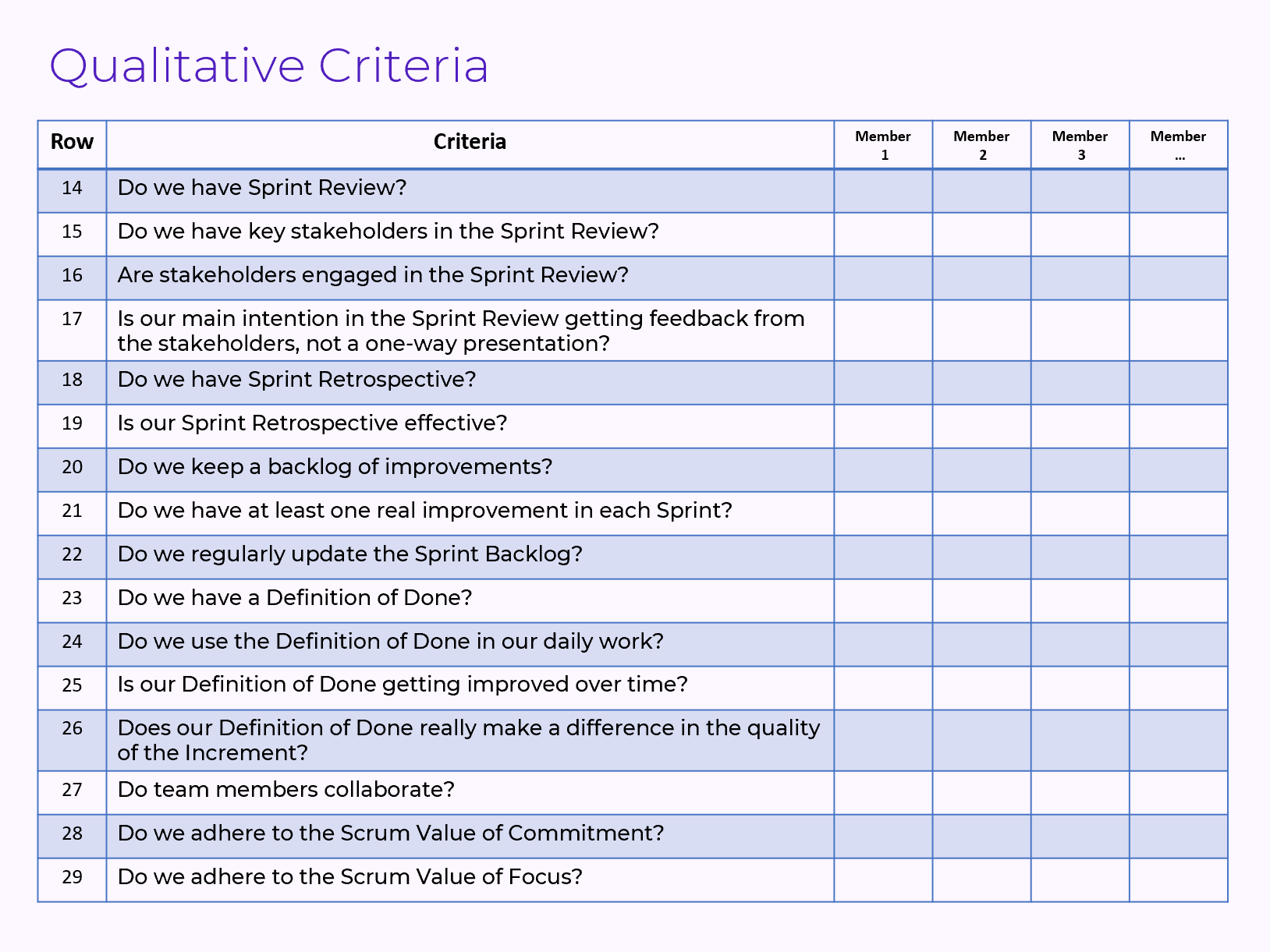
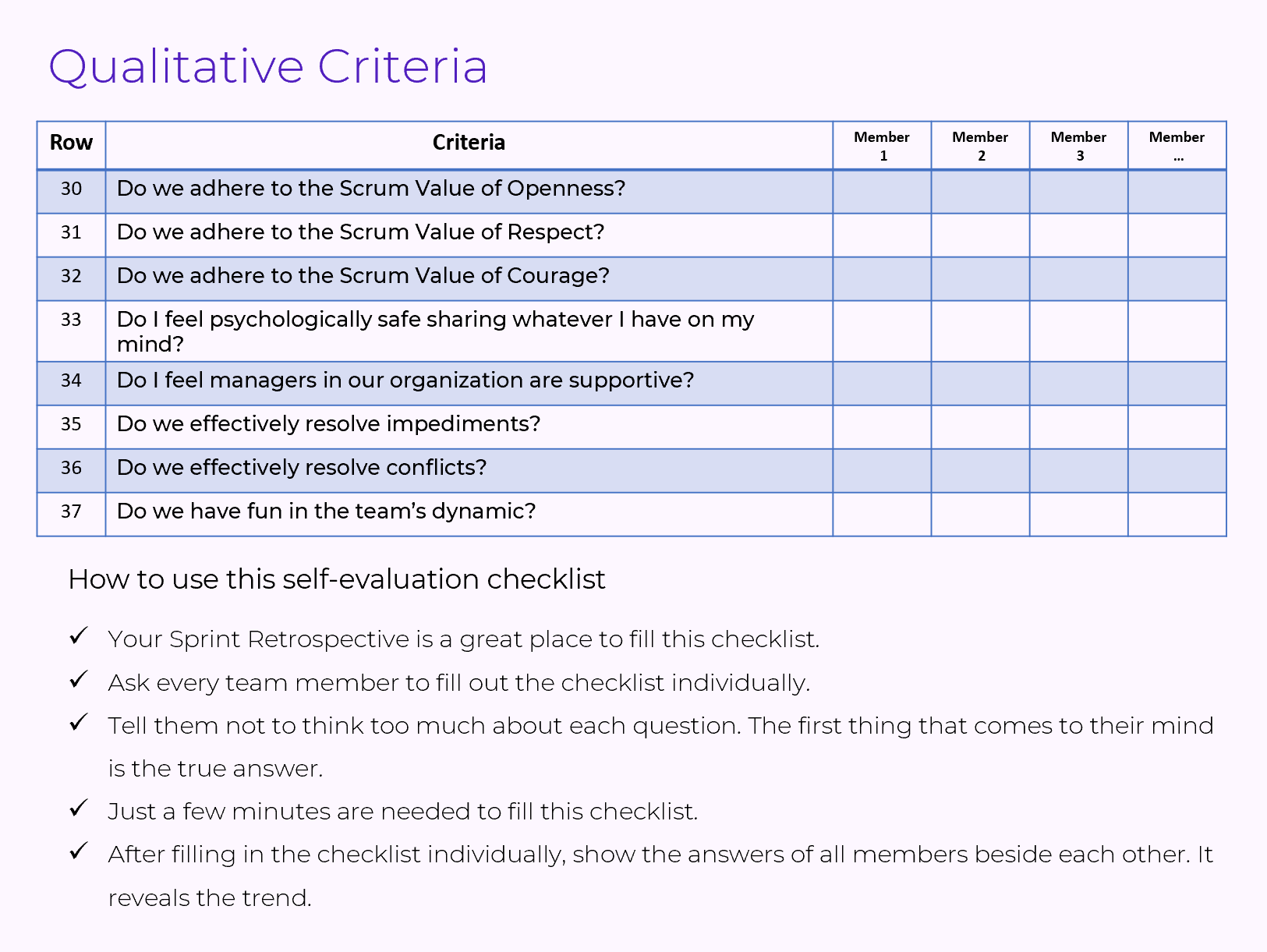
How to use this self-evaluation checklist
- Your Sprint Retrospective is a great place to fill this checklist.
- Ask every team member to fill out the checklist individually.
- Tell them not to think too much about each question. The first thing that comes to their mind is the true answer.
- Just a few minutes are needed to fill this checklist.
- After filling in the checklist individually, show the answers of all members beside each other. It reveals the trend.
Let's see a sample checklist
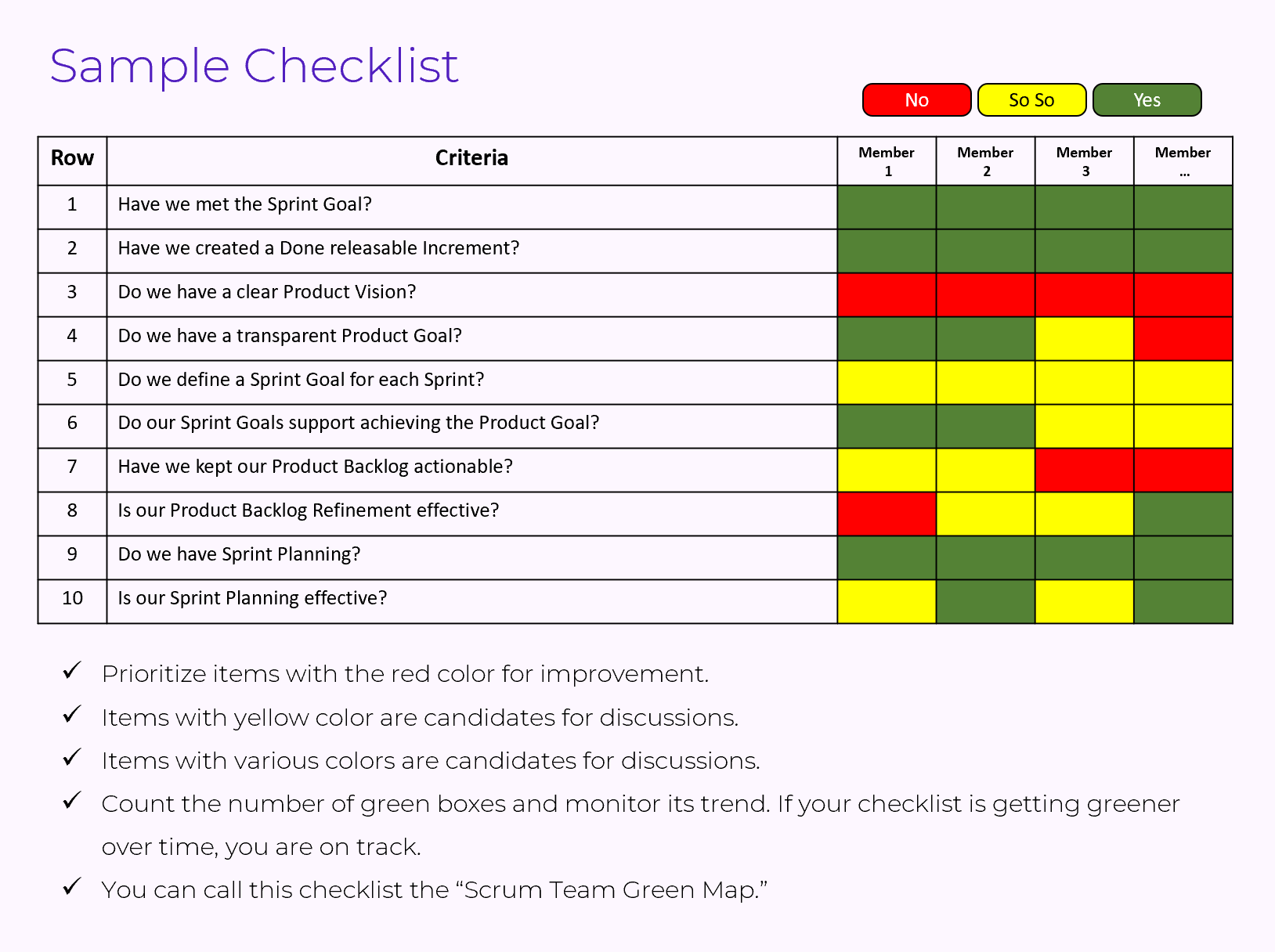
- Prioritize items with the red color for improvement.
- Items with yellow color are candidates for discussions.
- Items with various colors are candidates for discussions.
- Count the number of green boxes and monitor its trend. If your checklist is getting greener over time, you are on track.
- You can call this checklist the “Scrum Team Green Map.”
Visualization
How to visualize metrics to make the data available and visible to all.

There are great tools that you can use to visualize your metrics. See below examples.

Evaluation Process
Setting up the required infrastructure and process for the Scrum Team performance evaluation needs a relatively high amount of time and energy.
- Sit with your team and stakeholders to define quantitative criteria.
- Decide the interval for the evaluation of each metric.
- Define from where you want to collect the data for each metric. Fortunately, task management tools (like Jira, Azure DevOps) have almost all the required data.
- Define which tool you want to use to visualize the metrics.
- Connect your visualization tool with your data sources.
- For qualitative criteria, fill out the self-evaluation checklist.
- Sprint Retrospectives are great places to review the latest state of the metrics.
- Interpret metrics together.
- Metrics data are just a means to show your current status. They don’t tell you how to improve them or what your ideal state should be for each metric.
You can use AI deeply to interpret the metric data and create insights.
AI & Performance Evaluation
Let’s check how AI can help with the Scrum Team performance evaluation.

You can create AI Agents to help the team as an assistant to have a great interpretation of metrics, plus give you improvement suggestions. See the AI Agent below.
*** You can use Make.com, n8n, Zapier, etc. to create your AI Agents.
My recommendation is Make.com, which is simple and user-friendly.
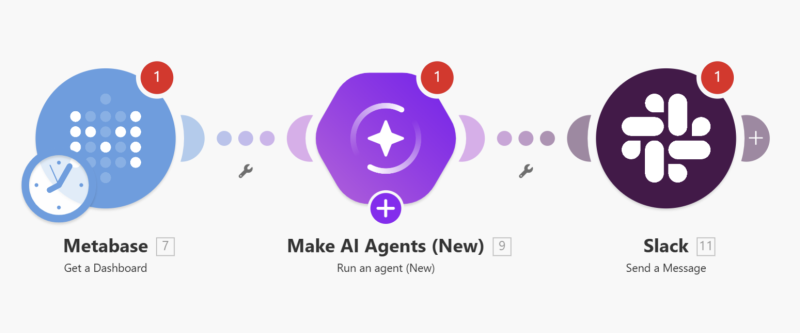
This AI Agent connects with Metabase to get the data, interpret metrics, and adds the interpretation into a Slack channel that you already created for this purpose. You can use this AI Agent as your assistant in your Sprint Retrospective.
--------------------------------------------------------------------------
If you want to learn how to practically design and setup a performance evaluation system for your Scrum Team, join my 4-hour live virtual class named "Practical Performance Evaluation for Scrum Teams."
Click here to get more information about the class.