
Many people ask what applying Professional Scrum in a real project looks like. So, I decided to document one of the projects that I was part of, and we used Scrum for it to create a robust Case Study, specifically for those who want to start their Scrum journey. Here is the result. Enjoy it.
Background
Why we decided to build a video course.
We have a training business, helping individuals and teams learn Professional Scrum and use it in action.
Once we decided to build a video course for Scrum pros to expand our business. So, we did a deep market research and checked many ideas based on the market needs.
Finally, we realized that Scrum players like Scrum Masters, Product Owners, and Agile Coaches (generally non-developers) want to have a high-level, basic understanding of technical knowledge to better understand and serve Developers. It helps them build a more meaningful relationship with Developers and be accepted by them.
We checked several names, and finally we agreed on this name for the course:

10 Day Understand Developers
Acquire basic technical knowledge of software development in just 10 days.
Project Preparation
Building Scrum Team
What skills we needed to have in our Scrum Team
We agreed:
1- Mehdi goes in front of the camera as the trainer of the course.
2- Pooya prepares all the technical content as he has a long experience as a developer (15+ years).
3- Kasra does all the web development, like creating a course landing page, registration process, …
4- Samira does all the editing and mixing of the raw videos to create the final polished videos.
5- As we all had been working in our Scrum training business for several years and were aware of how Scrum works, we decided that we would all take over the Scrum Master accountability together, which was a great experience.

Project Scope Brainstorming
How we defined what we needed to do
We ran a brainstorming session to define various aspects of the project scope. So, we did it through three steps:
Step 1: Defining the main areas of the work

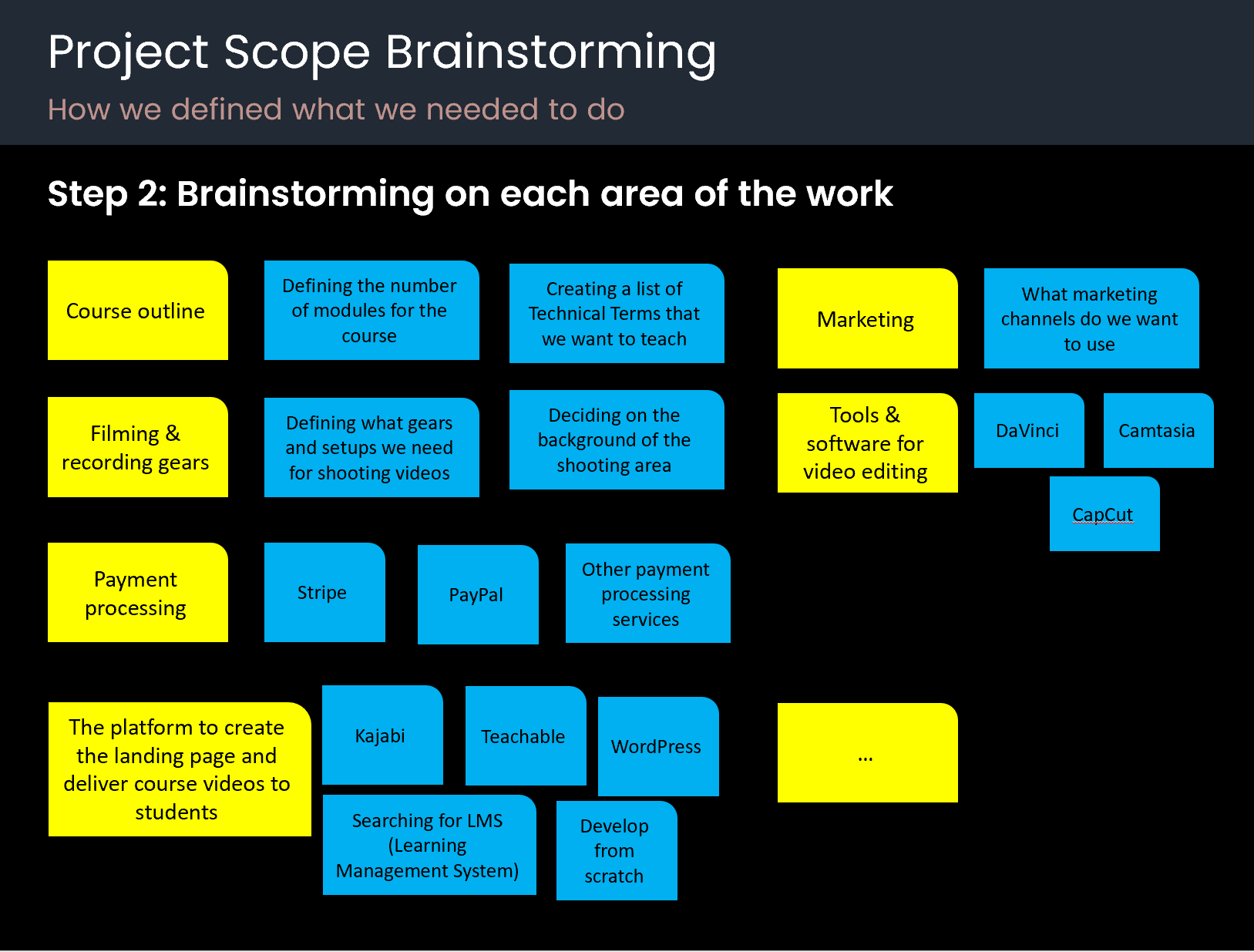
Step 2: Brainstorming on each area of the work
Step 3: Building the Product Backlog
To shape the Product Backlog, we started by defining the Product Goal. We discussed a lot in the team and finally agreed on the Product Goal.
Then we added the most important work items.
In addition, we just kept it simple. So, we wrote Product Backlog Items in free format and didn’t use other formats, such as User Stories.
Team Agreement
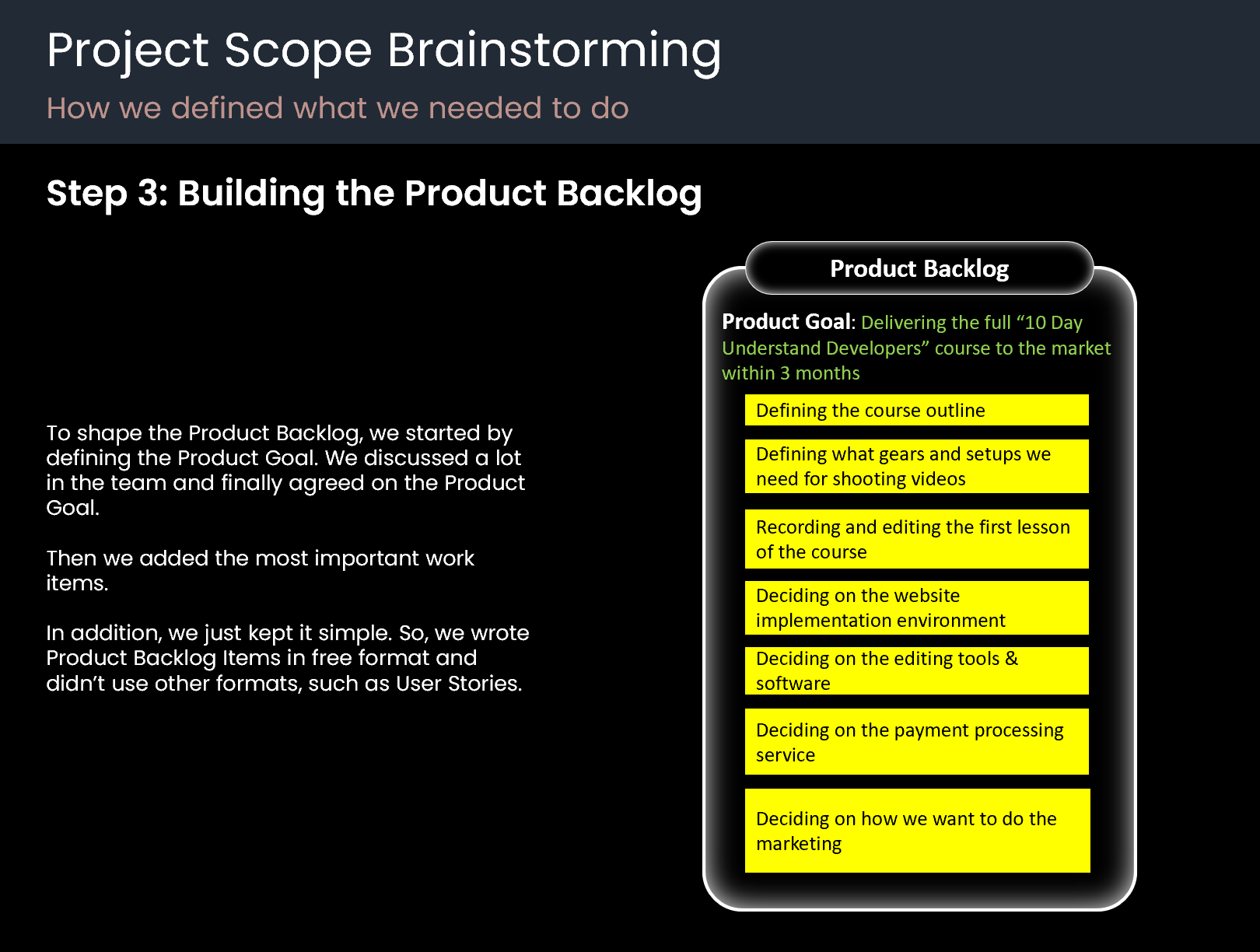
What we agreed as the rules that the team should follow
Team Agreement is a dynamic, evolving concept. So, it is better to have versioning for it and improve it whenever you learn the team needs a new rule.
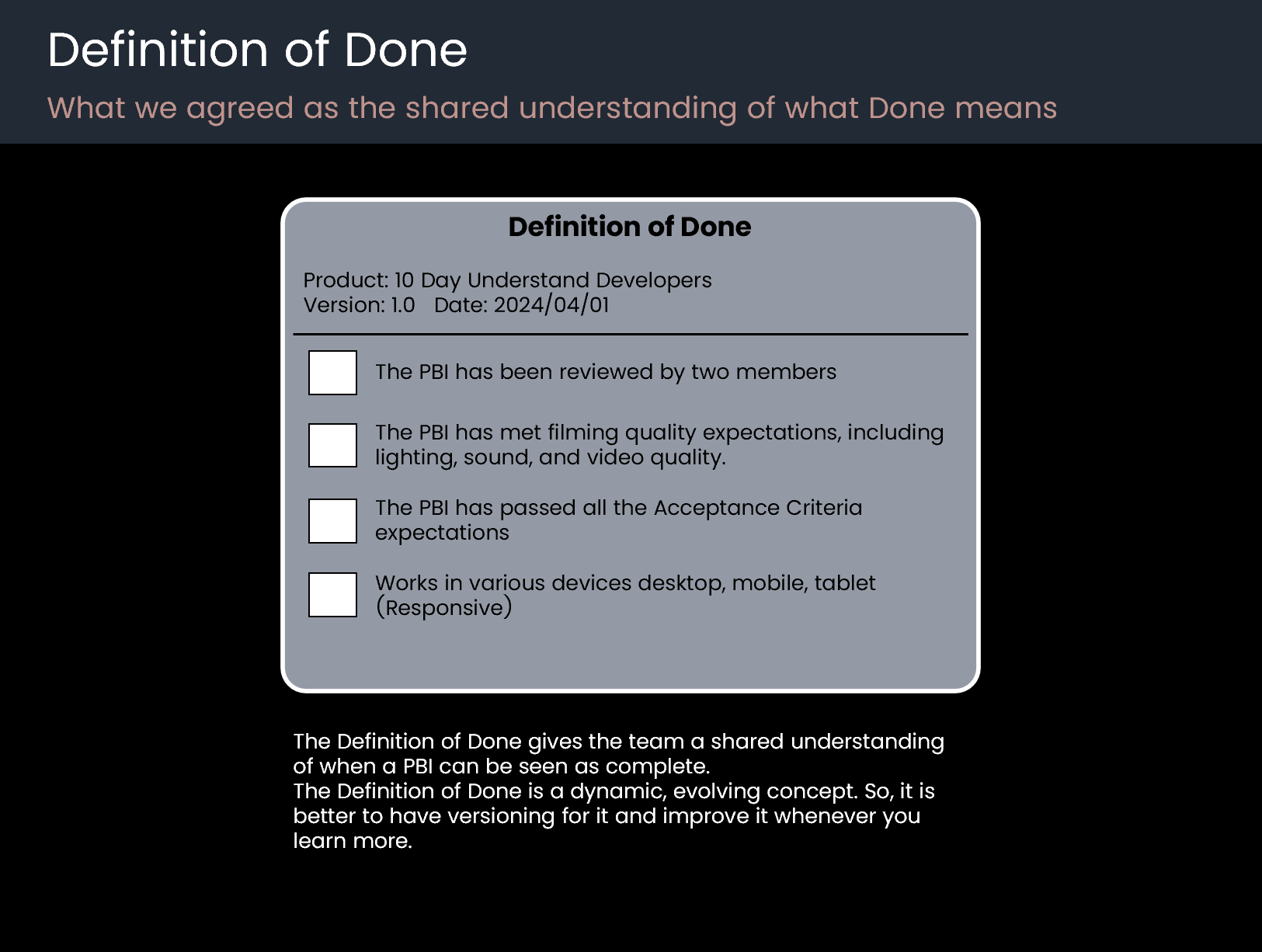
Definition of Done
What we agreed as the shared understanding of what Done means.
The Definition of Done gives the team a shared understanding of when a PBI can be seen as complete.
The Definition of Done is a dynamic, evolving concept. So, it is better to have versioning for it and improve it whenever you learn more.
Sprint 1
Day 1
Sprint Planning
How we answered Why, What, and How to plan the Sprint
We started the day with Sprint Planning to decide where we want to focus our effort.

Why
We discussed a lot with the team in the Sprint Planning to create the Sprint Goal for the first Sprint. It was challenging, as we still needed to set up and prepare our environment. So, we decided to focus our energy on creating and editing the first video lesson while we do the environment preparation in parallel.
I can say 80% of the effort went to setting up the environment and preparation, and 20% went to creating the first video lesson. With this approach, we guaranteed that we would create at least one business functionality that has meaning for the end user.
So, the result was this:
Sprint Goal: Creating the first video lesson
This Sprint Goal helped us to tackle all uncertainties of creating a video lesson right in the first Sprint. So, if we had any problem, limitation, or constraint, we would be aware of it early in the first Sprint.
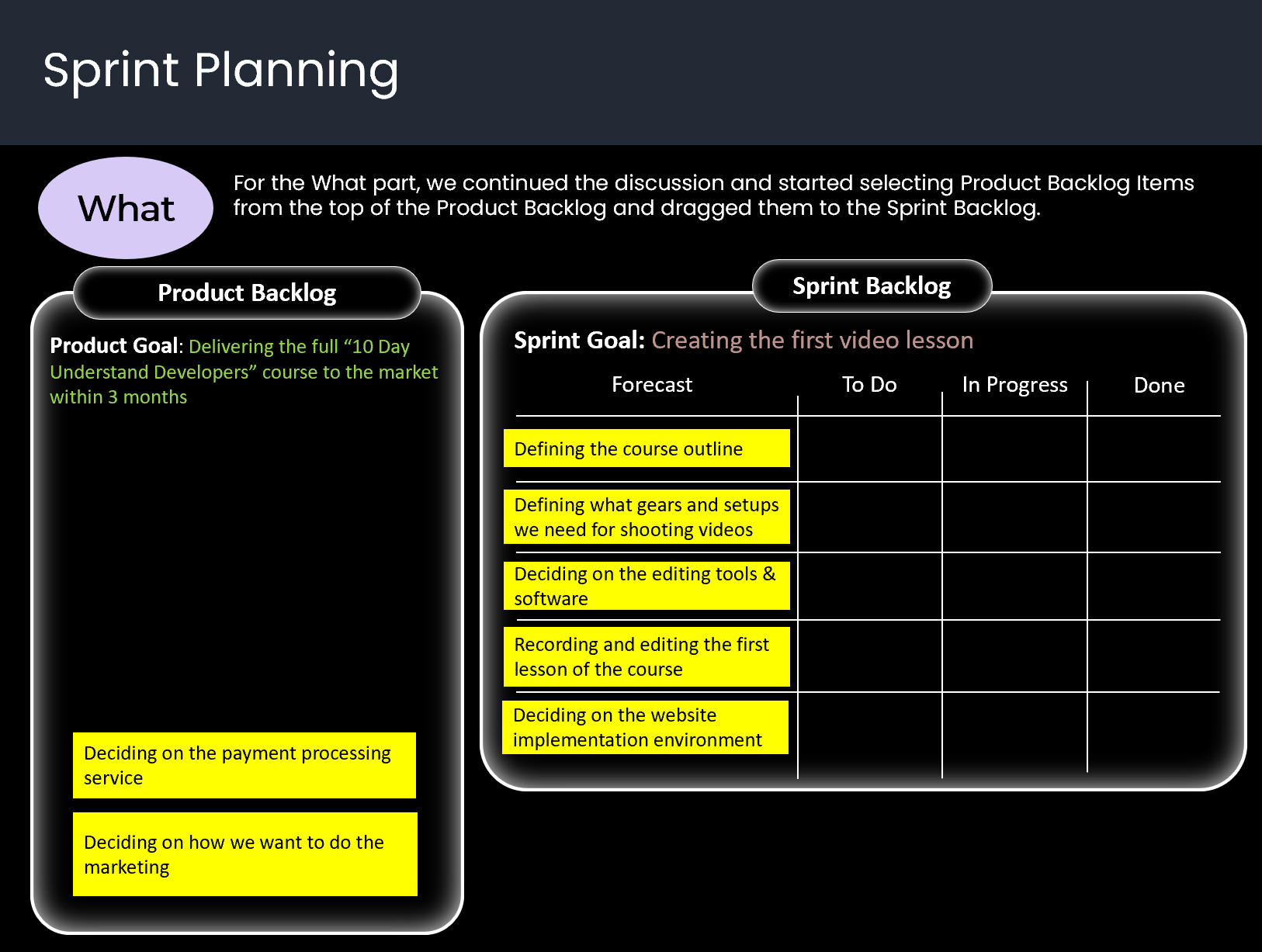
What
For the What part, we continued the discussion and started selecting Product Backlog Items from the top of the Product Backlog and dragged them to the Sprint Backlog.
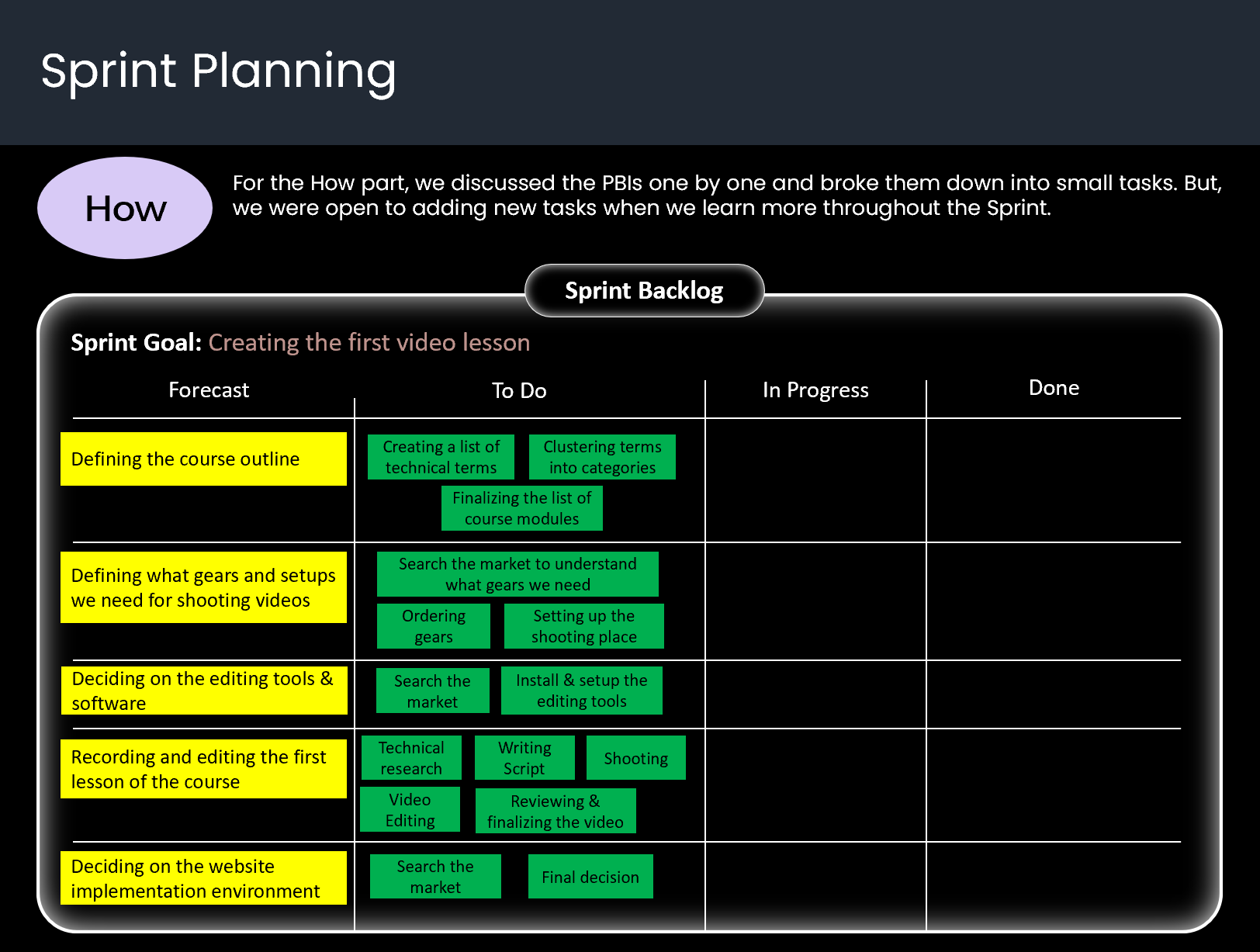
How
For the How part, we discussed the PBIs one by one and broke them down into small tasks. But, we were open to adding new tasks when we learn more throughout the Sprint.
Implementation - Day 1
How we collaborated throughout the Sprint to create Done Increments.
After Sprint Planning, we together decided who would do what. Then we collectively assigned tasks and dragged them to the In Progress column. Some tasks had two assignees. This is the shape of the Sprint Backlog when we started the implementation:

Daily Scrum 1
How we got aligned on a daily basis toward the Sprint Goal.
At the end of the first day, we gathered online at 6:00 PM for the first Daily Scrum to share what we had done. We decided to use a free format, but with the focus on moving toward the Sprint Goal. See, this conversation among the team:
-----------------------------------------------------------------------------------
Pooya: “I did a deep search for technical terms and collected a list of them.”
Mehdi: “Yes, I did the same to help Pooya. It seems there are many technical terms that we should teach people.”
Pooya: “That’s right. Finally, we integrated our lists into one list, including 65 technical terms.”
Kasra: “Yeah, it seems too many. I’m myself eager to learn all the terms when the course is finished [Laughing].”
Samira: “I also checked the most famous video editing tools in the market. There are many options with various pros and cons. Two options match our requirements better. DaVinci and Camtasia.”
Pooya: “I haven’t heard about them. I’m curious to know more. What is your final decision?”
Samira: “DaVinci is free, but it is too heavy and needs strong hardware. It is said that it is used for editing Hollywood movies. The next one is Camtasia, which is a simple, light tool that works well for our requirements. So, my final decision is Camtasia. More than that, I already have a bit of experience working with Camtasia.”
Mehdi: “Cool. Then we have finalized choosing the editing tool. Good progress.”
Kasra: “For my task, I reviewed several options, including WordPress, Kajabi, developing from Scratch, etc. Developing from scratch needs a lot of time. WordPress is ok but it needs some development. However, I see Kajabi is created specifically for trainers. With drag and drop, you can create your landing page, and it has a built-in panel for learners to watch video lessons.”
Pooya: “Working with a dedicated tool to implement the landing page and other pages saves us a lot of time. As a developer, as we have some unknowns, I prefer we start with Kajabi.”
Kasra: “I agree. It helps us create the landing page and video play panel early to get feedback from the market. So, I confidently say my decision is Kajabi. As our decision is clear now, I think we need to add a PBI to the Sprint Backlog to implement the course landing page.”
Mehdi: “Yes, let’s do it. I will help you create a sketch for the landing page.”
Kasra: “That’s great. What else?”
Mehdi: “I also checked the market for the gears we need for shooting videos. We need lighting + stand, collar mic, camera, tripod for camera, teleprompter, a vase for the background and multicolour floor lamp. I even defined their brand. I will order them tonight on Amazon. I don’t want to lose time and want to have them as soon as possible to be able to record the first video lesson this week, as it is our Sprint Goal.”
Samira: “Good decision. It’s promising. Even for the first day, we had good progress.”
Pooya: “Well done, team. Let’s update the Sprint Backlog.”
-----------------------------------------------------------------------------------
This is the updated Sprint Backlog at the end of the first Daily Scrum. We not only moved completed tasks to the Done column but also discussed what we want to work on tomorrow and moved them to the In Progress column.

Day 2
Implementation - Day 2
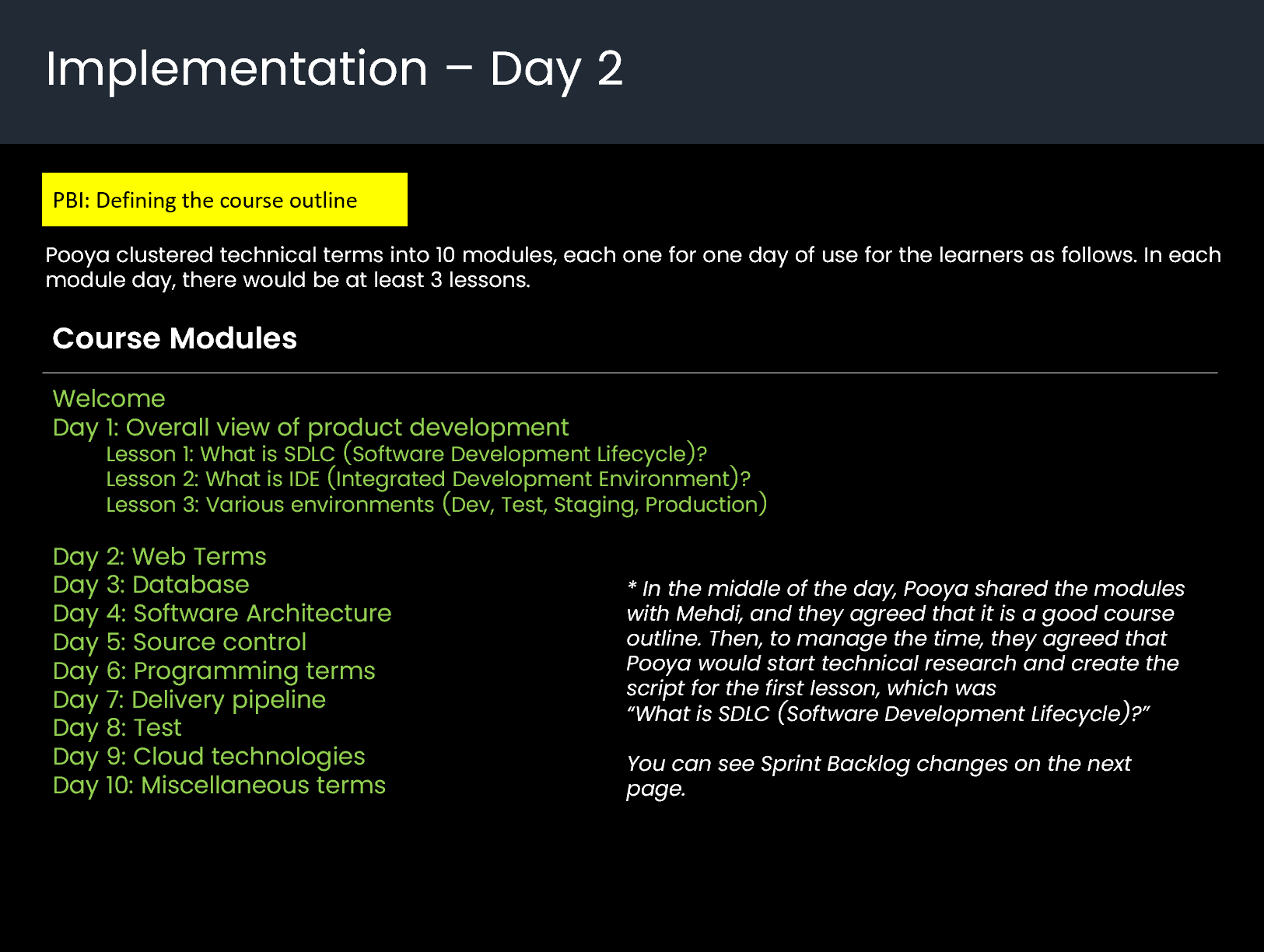
On day 2, Pooya continued working on technical terms, clustered them, and created a list of course modules as follows:
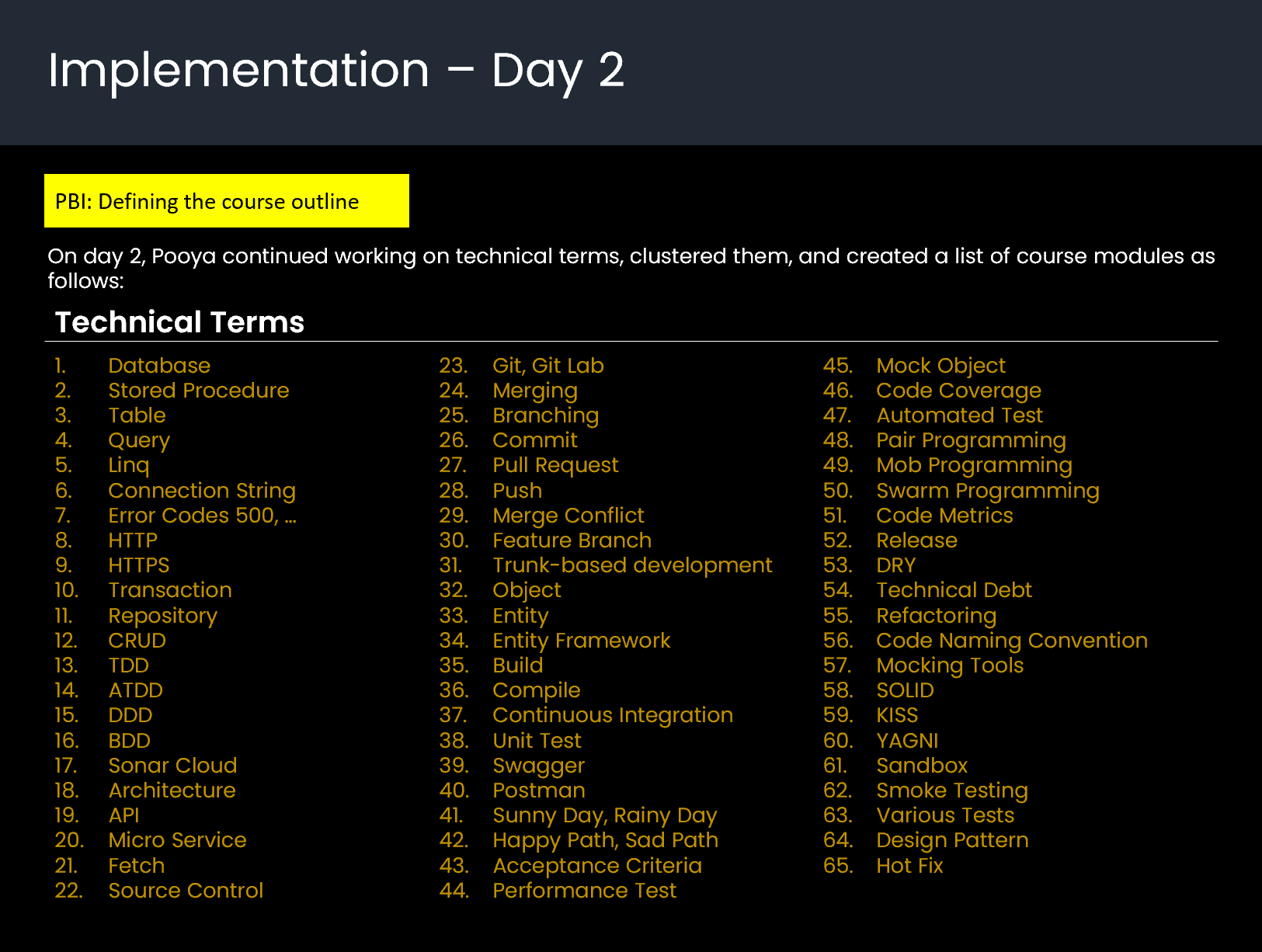
Pooya clustered technical terms into 10 modules, each one for one day of use for the learners as follows. In each module day, there would be at least 3 lessons.
* In the middle of the day, Pooya shared the modules with Mehdi, and they agreed that it is a good course outline. Then, to manage the time, they agreed that Pooya would start technical research and create the script for the first lesson, which was
“What is SDLC (Software Development Lifecycle)?”
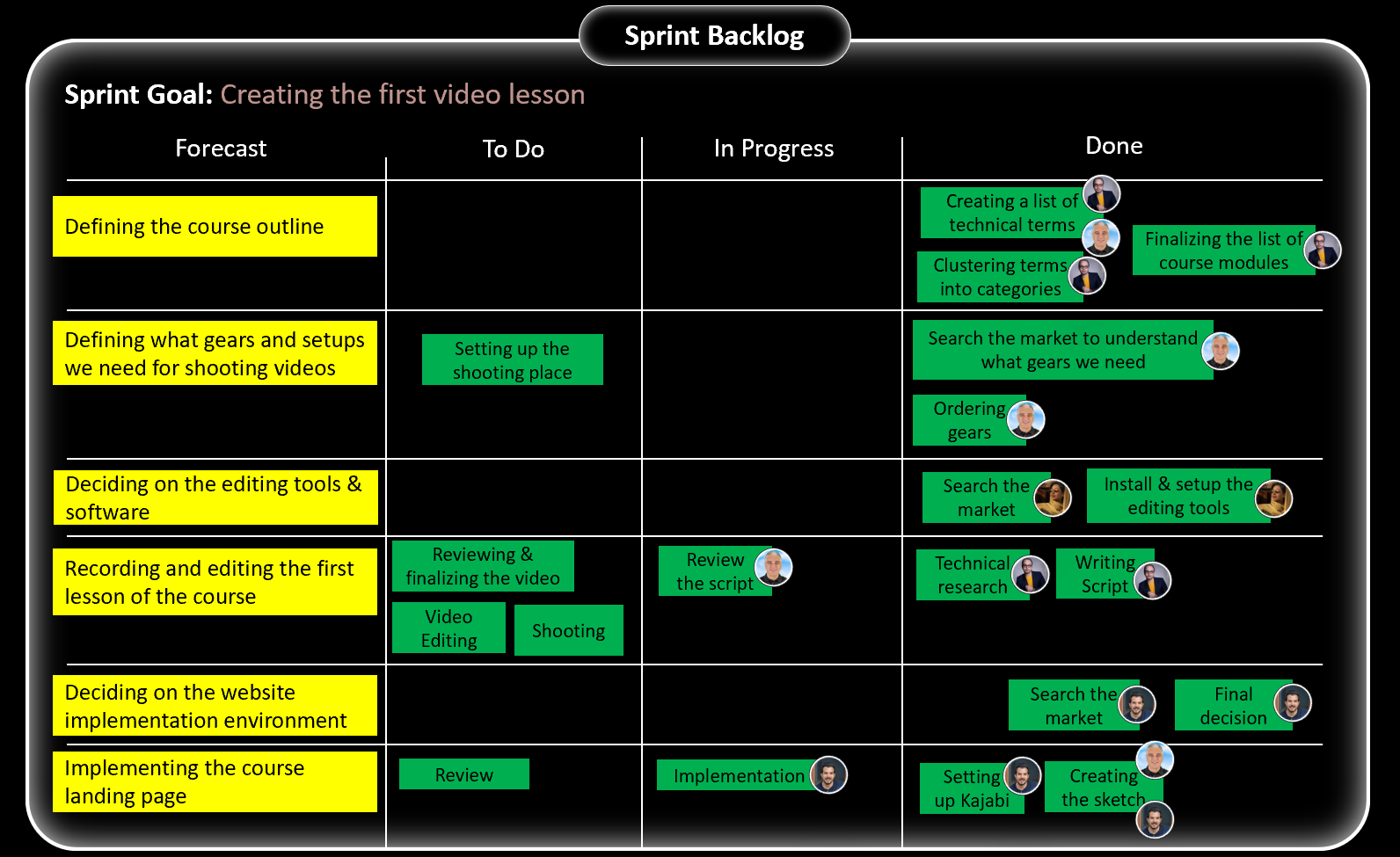
You can see the Sprint Backlog changes here:

Daily Scrum 2
At the end of the second day, we gathered online at 6:00 PM for the second Daily Scrum to share what we had done. See, this conversation among the team:
-----------------------------------------------------------------------------------
Pooya: “I clustered technical terms into 10 modules, each one for one day of use for learners. I checked it with Mehdi, and we agreed on following it. I have also updated the board.”
Kasra: “Thanks, Pooya. I see there is a Welcome module in the course outline. What is it?”
Pooya: “This was suggested by Mehdi.”
Mehdi: “Yes, this is a welcome video for learners to give them the overall information of the course, introducing various modules, and welcome them to the course to get a good feeling of buying the course.”
Kasra: “Aha, got it. That’s a great idea.”
Mehdi: “Ok, on my side, last night, I ordered all the gears from various websites. Because I wanted to make sure that we would have all of them tomorrow. When they are delivered, I will take a picture of them and share them with you.”
Samira: “Then we will have our filming studio, and for future courses, we don’t need to buy them again. It’s a good investment.”
Samira: “By the way, I installed Camtasia and, of course, Photoshop, if we need any design for the video footage. More than that, I signed up for the Freepik service, which gives us a large pool of stock images that we can use for the video footage.”
Mehdi: “Thank you, Samira, for all the setup that you did.”
Pooya: “It’s my turn now. Mehdi and I decided to focus on the first lesson, which is - What is SDLC (Software Development Lifecycle)? – I have done deep research and wrote its script. It’s now ready to be used.”
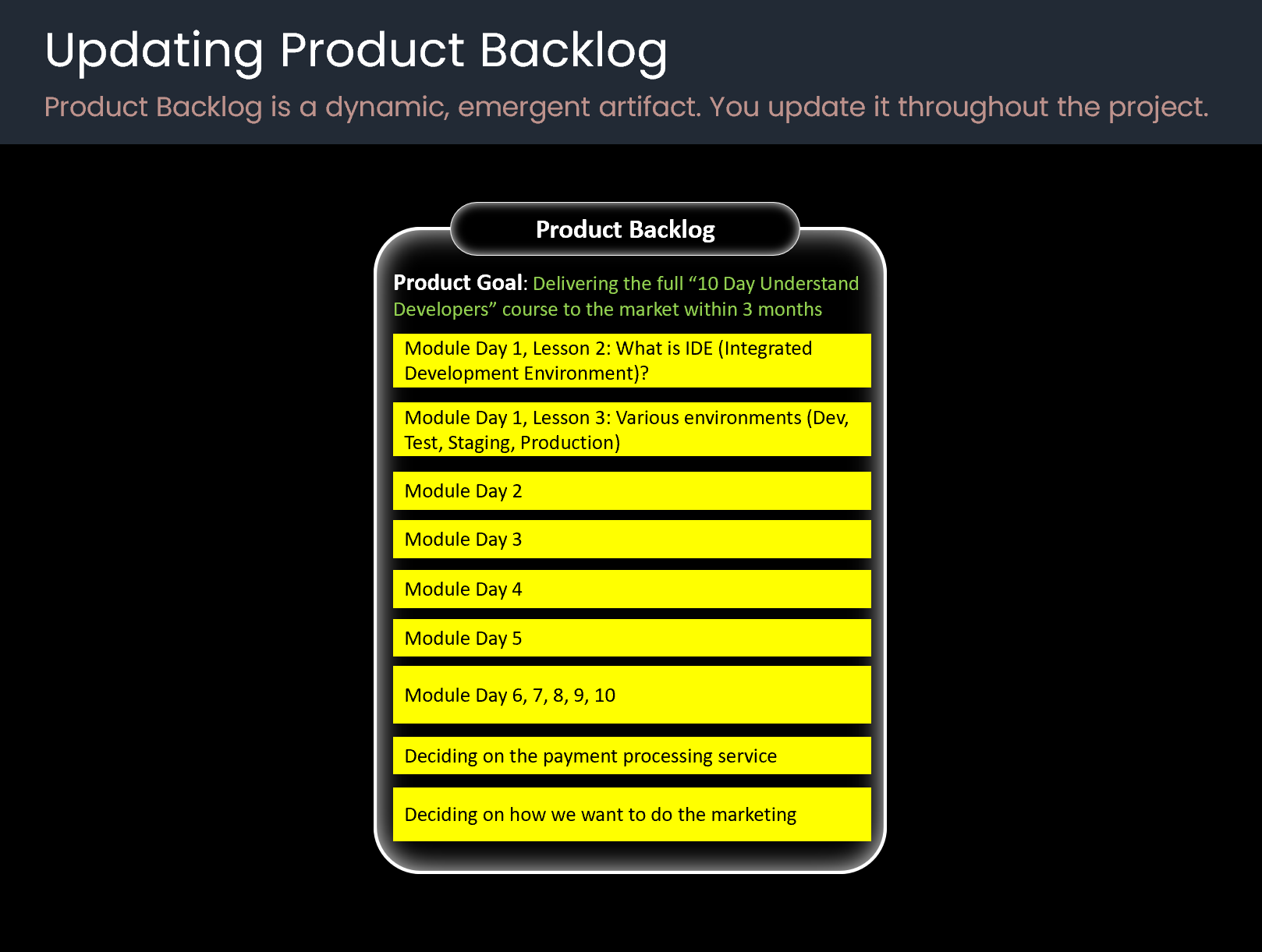
Mehdi: “That’s awesome. I will review it and inform you if it needs any changes. More than that, I think it is better to add all modules to the Product Backlog. Then, in each refinement, we can break them down into lessons. Would you agree, guys?”
Pooya, Kasra, Samira: “Yes, why not?!”
Mehdi: “Then, Pooya, you can start creating a script for the second lesson. We can see it as part of the refinement. Is it ok?” Pooya: “Yes, for sure. Then, I will always be one week ahead of you and have enough time to do good research and write a quality script.”
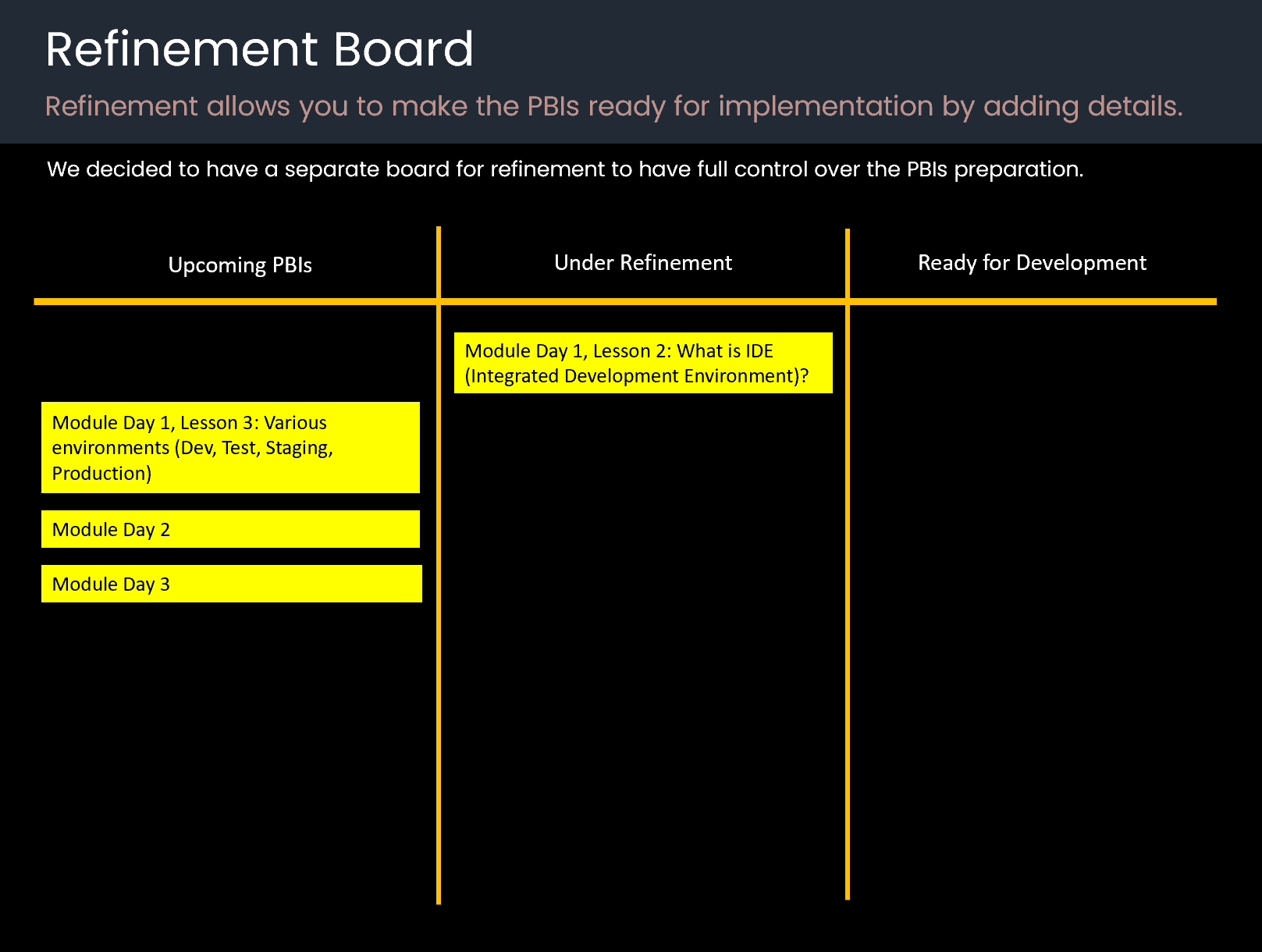
Mehdi: “Cool, I will create a board for the refinement and put the second lesson under refinement.”
Kasra: “On my side, I set up Kajabi, and it is ready now. More than that, Mehdi and I worked together and created a sketch for the course landing page. We used PowerPoint to create the sketch. We just wanted to keep the sketching process simple. Tomorrow, I will work with Kajabi to become familiar with its environment and start the landing page implementation.”
Pooya: “That’s nice. It seems the snowball started moving.”
Mehdi: “Ok, guys. See you tomorrow.”
-----------------------------------------------------------------------------------
This is the updated Sprint Backlog at the end of the second Daily Scrum.
Updating Product Backlog
Product Backlog is a dynamic, emergent artifact. You update it throughout the project.
Refinement Board
Refinement allows you to make the PBIs ready for implementation by adding details.
We decided to have a separate board for refinement to have full control over the PBIs preparation.
Day 3
Implementation – Day 3
Finally, all the gears that I bought arrived. I immediately assembled them.
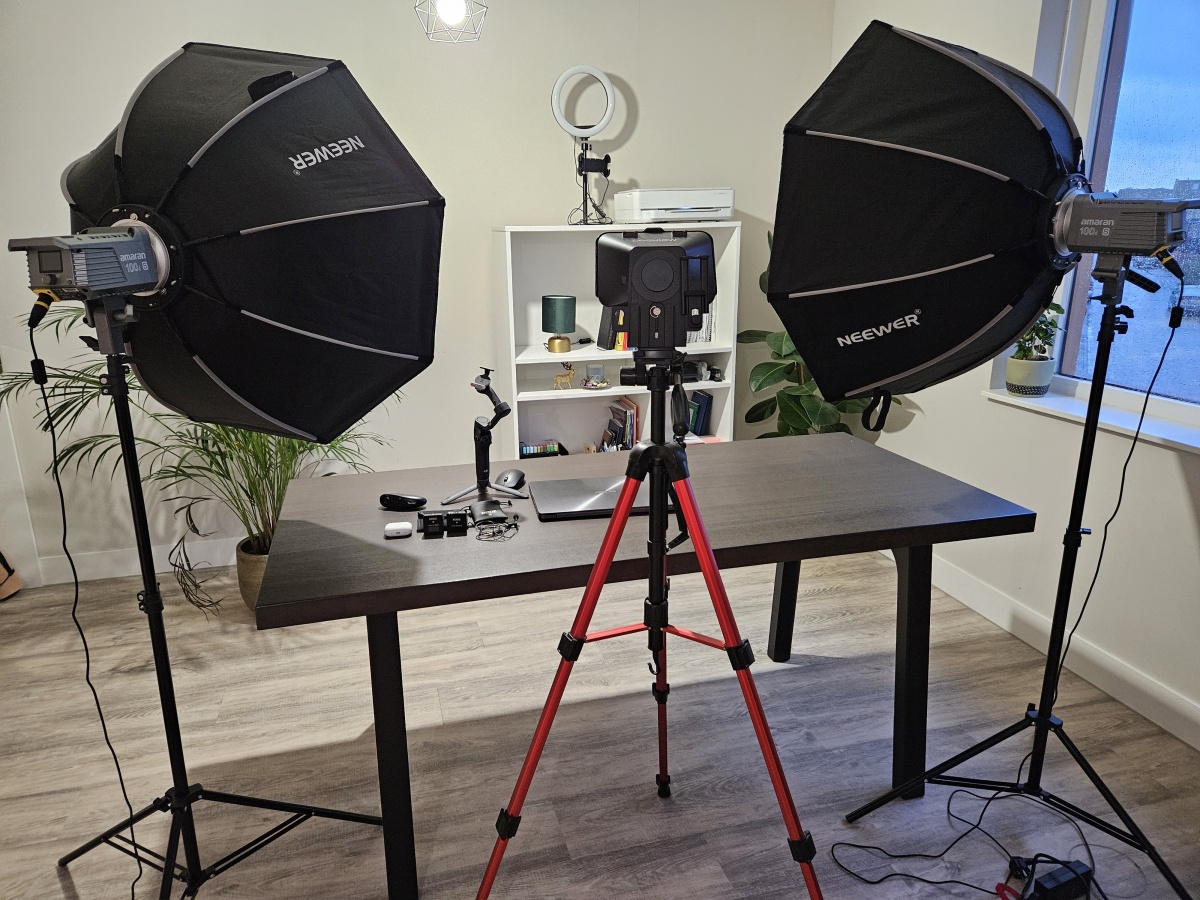
In the afternoon, I went in front of the camera and shot the first lesson. This is an image of the first recording. You can see my home studio, including lighting, collar mic, floor lamp in the background, etc.

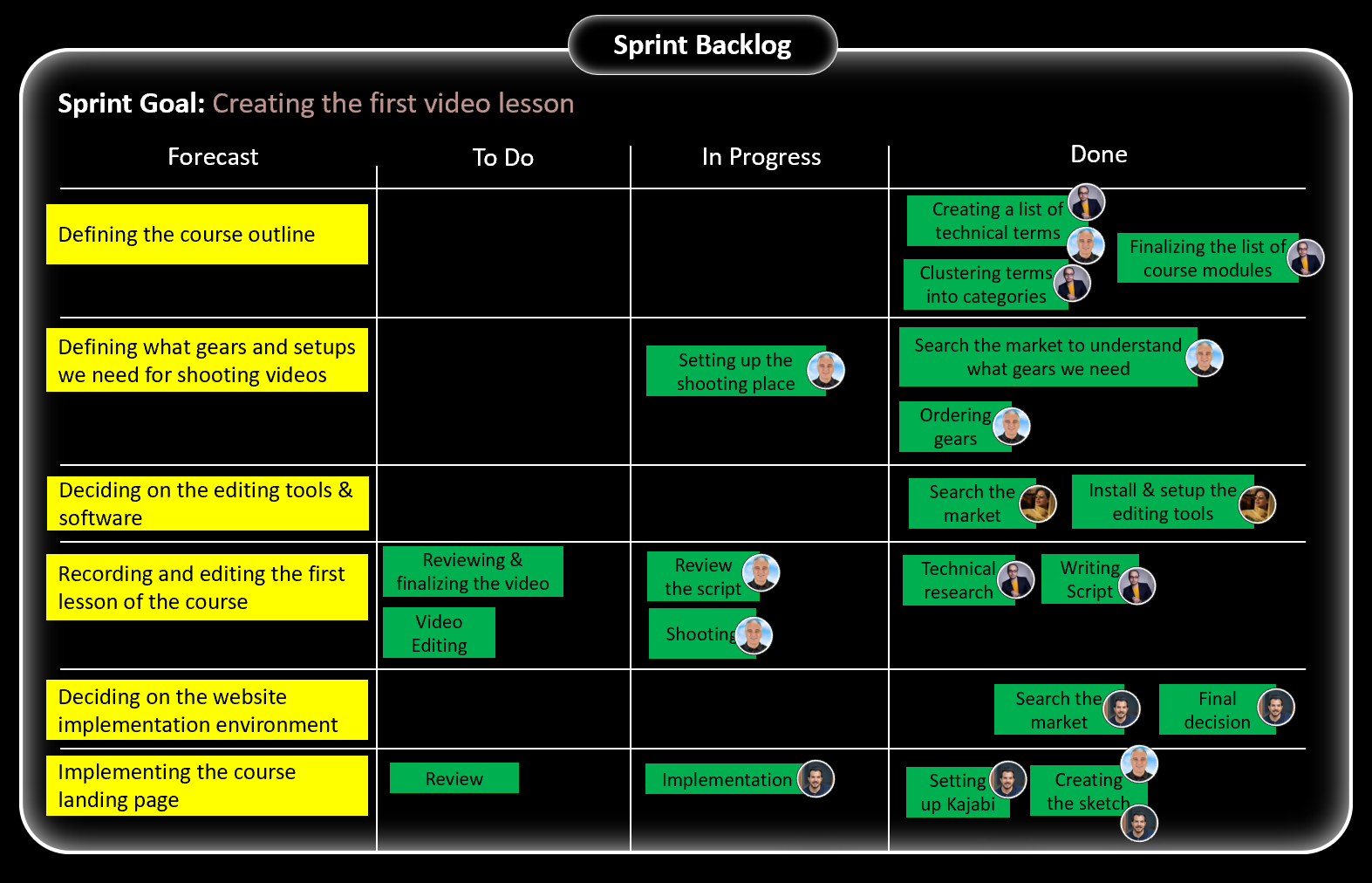
This is the updated Sprint Backlog in the middle of day 3.
Daily Scrum 3
At the end of the third day, we gathered online at 6:00 PM for the third Daily Scrum to share what we had done. See, this conversation among the team:
-----------------------------------------------------------------------------------
Mehdi: “Hey guys, finally this morning all gears arrived, and I immediately assembled them.”
Kasra: “That’s good news. Congratulations, team.”
Mehdi: “In the morning, I reviewed the script of lesson 1 that Pooya created yesterday and improved it a bit. In the afternoon, I went in front of the camera and shot the first video.
Samira: “Then is it ready for editing?”
Mehdi: “Yes, from now, you can start editing.”
Samira: “Wonderful. I will try to finish it by tomorrow afternoon.”
Kasra: “I also worked on Kajabi to become familiar with its environment. It is user-friendly. More than that, I started the landing page implementation. Our landing page has 33 sections, which is a long landing page. Today, I could finish the first section because there were a lot of unknowns for me on how to work with Kajabi.”
Pooya: “It is natural, Kasra. When we start using a new tool, there is a learning curve for it. By the way, I started technical research for lesson 2. You can see it on the Refinement Board.”
Samira: “Unfortunately, I didn’t have a task today. So, I just used this time and worked with Camtasia to become ready for editing.”
Mehdi: “No worries, Samira. Sometimes it happens. Guys, it is obvious that we are on track and we can achieve the Sprint Goal. Let’s update the Sprint Backlog to be ready for tomorrow.”
-----------------------------------------------------------------------------------
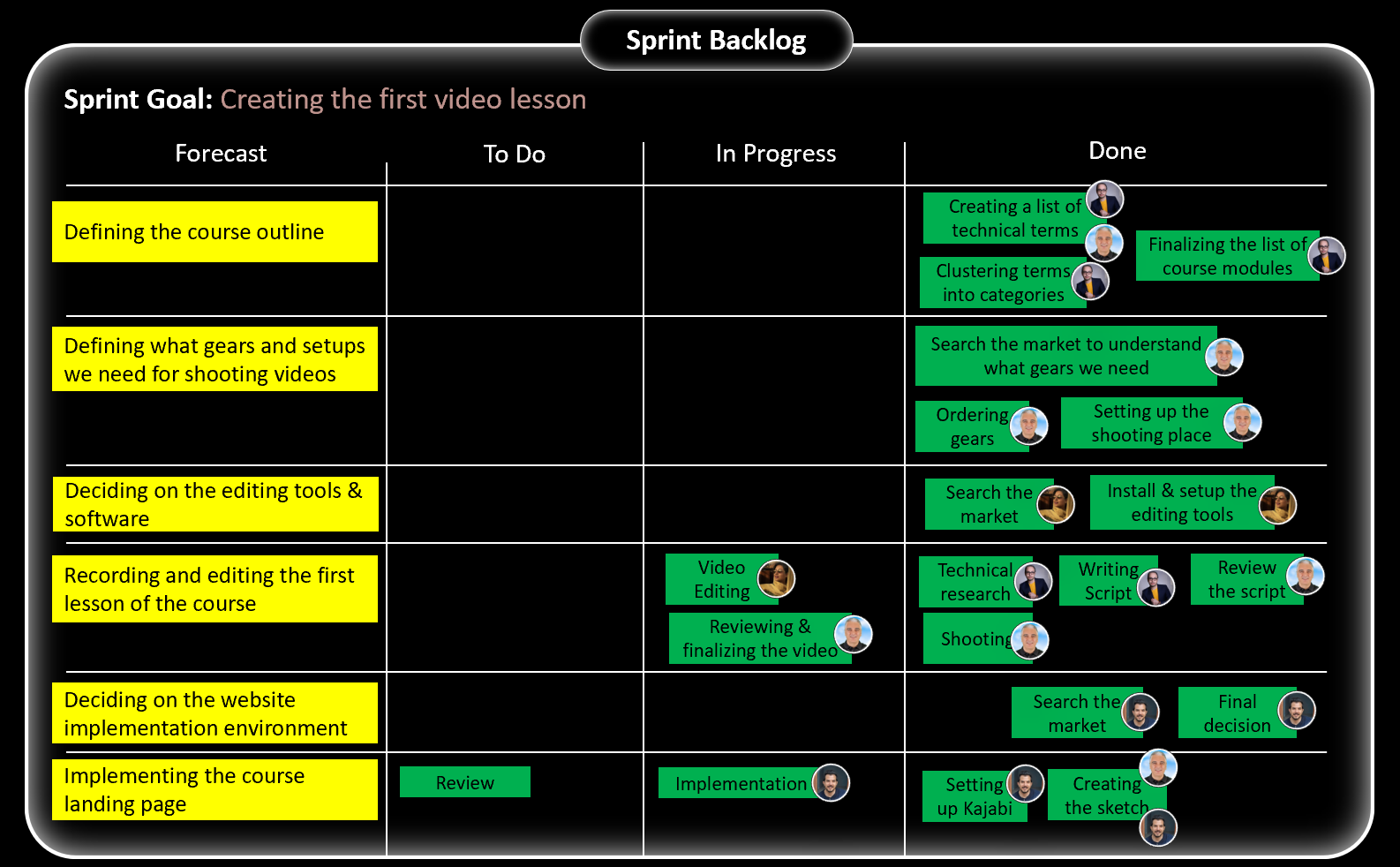
This is the updated Sprint Backlog at the end of the third Daily Scrum.
Day 4
Daily Scrum 4
At the end of the fourth day, we gathered online at 6:00 PM for the fourth Daily Scrum to share what we had done. See, this conversation among the team:
-----------------------------------------------------------------------------------
Samira: “The whole day, I worked on editing the video. There were some unknowns, but I could manage them.”
Kasra: “Is it ready now?”
Samira: “Yes, it is being rendered now, and I think within 30 minutes it will be available for the final review by Mehdi.”
Kasra: “That’s nice. Let’s see the final result.”
Samira: “Mehdi and I had several conversations today. For better alignment, we decided that Mehdi would add comments on the script about the editing expectations.”
Mehdi: “We also agreed on sharing files like scripts, footage, and videos on Google Drive. Thanks to Samira. She did a great job today.”
Pooya: “I continued the technical research for lesson 2. I am almost there.”
Kasra: “And I’m continuing the landing page implementation. As I already told you, it has 33 sections. To better monitor the progress, I suggest we divide them into 4 parts, each of which includes around 8 sections. For example, today, I finished 8 sections. So, I can say, part 1 is finished.”
Pooya: “That’s a good idea. Let’s do it.”
Mehdi: “Ok, guys. Tomorrow we will have our first Sprint Review. It is obvious that we will achieve the Sprint Goal, which is really great. Samira, when the video render is done, ping me to do the final review. See you then, guys.”
-----------------------------------------------------------------------------------
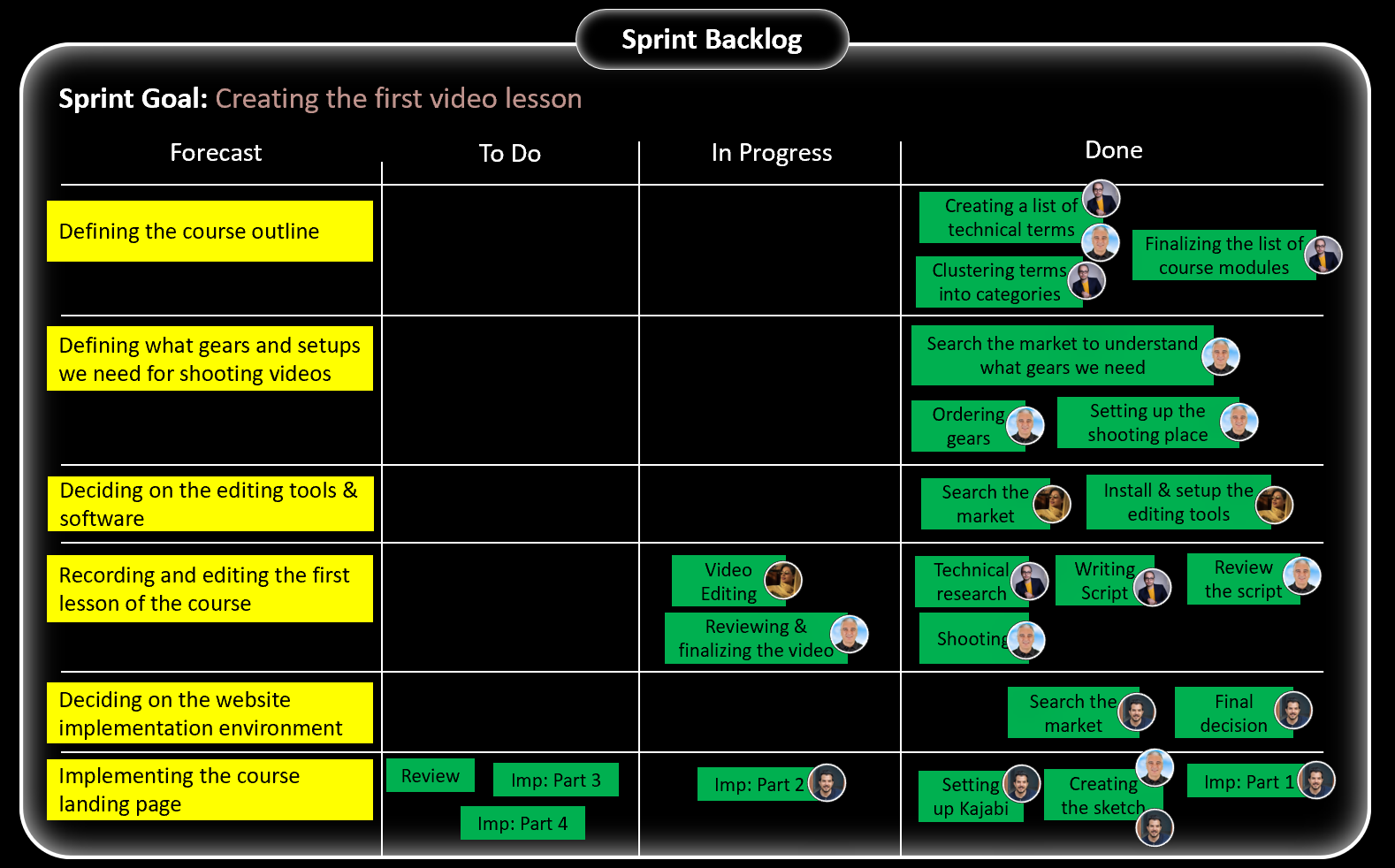
This is the updated Sprint Backlog at the end of the fourth Daily Scrum.
Day 5
Day 5 was the last day of the Sprint. We prepared ourselves for the Sprint Review and the Sprint Retrospective.
1- Mehdi did the final review of the video and gave Samira feedback about some tiny changes.
2- Kasra continued landing page implementation – part 2.
3- Pooya worked on creating a script for lesson 2.
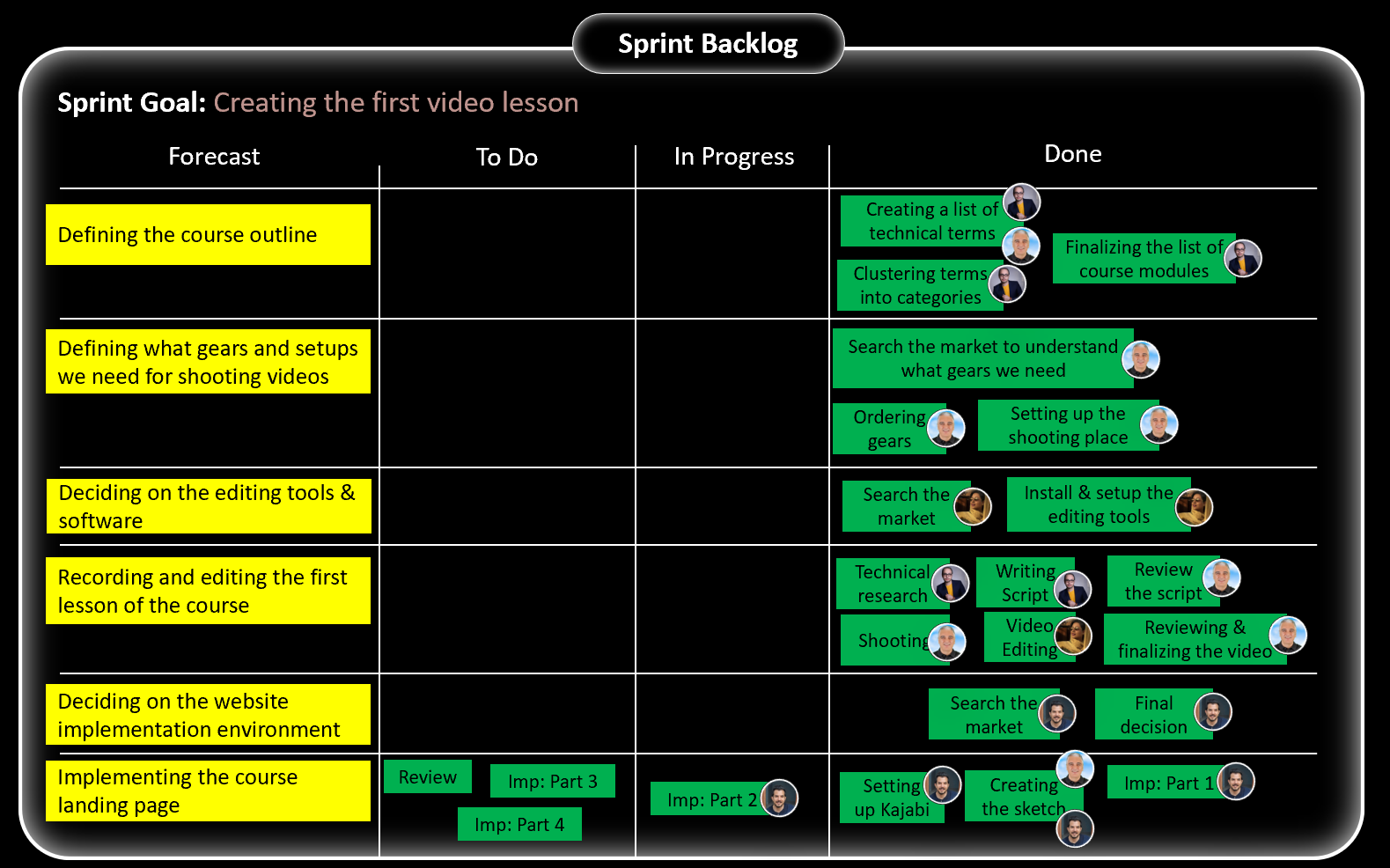
This is the updated Sprint Backlog right before the Sprint Review.
Sprint Review
How we inspected the Increment and collected feedback.
At 11:00 AM we started the Sprint Review. See, this conversation among the team:
-----------------------------------------------------------------------------------
Increment Inspection
Mehdi: “Guys, welcome to the first Sprint Review”.
Kasra: “I’m really passionate about watching the first video.”
Mehdi: “Ok, guys. Let’s jump in. Samira, would you please play the video?”
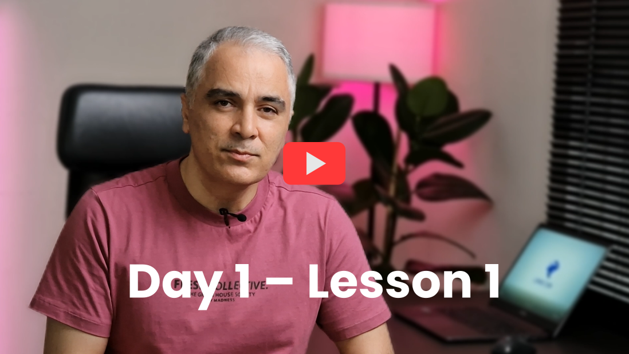
Samira: “Yes, sure. It is a 7-minute video. Here you go.”
Pooya: “That’s awesome. I really loved it.”
Kasra: “Me too. Thanks, guys.”
Pooya: “Maybe, some feedback. I think it is better we put on a light background music.”
Mehdi: “Good idea. Let’s do it.”
Samira: “Yes, I like the idea as well. So, I will search for some music and share it with you to choose one.”
Kasra: “On my side, I think we should make the video more dynamic by adding some effects, cuts, etc. It is a bit boring as we just see Mehdi’s face for over 7 minutes.”
Samira: “I was thinking the same. I can add some effects, more footage, zoom in – zoom out, etc.”
Mehdi: “Ok, Samira. Please do it, and then we will check it if it passes expectations.”
Sprint Goal Inspection
Mehdi: “Guys, let’s check the Sprint Goal. It is “Creating the first video lesson”. Have we achieved it?”
Pooya: “Yes, sure. Although it needs some tweaks, we have achieved the Sprint Goal.”
Kasra: “Yes, I agree. This is the nature of the Sprint Review. You have brought a done Increment to get feedback. So, now the feedback says we should have some changes in the video.”
Samira: “I fully agree. Just within the first Sprint, with a lot of unknowns, we could create the first video.”
Mehdi: “Ok, guys. Congratulations on meeting the Sprint Goal and well done.”
Product Goal Inspection
Mehdi: “How about the Product Goal?”
Kasra: “It is completely obvious. We took a great step toward the Product Goal. By creating the first video, we proved that we can create, edit, and finalize videos.”
Pooya: “Yes, Kasra. I am sure that next Sprint, we will have a higher speed. We will create several videos.”
Samira: “If we move forward with this process, for sure, we will achieve the Product Goal as well.”
Updating Product Backlog
Mehdi: “Ok, guys, what changes do you have in your mind for the Product Backlog?”
Pooya: “I guess, next Sprint, we can complete 3 more videos. So, let’s drag the PBIs of the 3 video lessons to the top of the Product Backlog (Day 1 - Lesson 2, Day 1 – Lesson 3, Day 2 – Lesson 1).”
Kasra: “Are you sure you can do the technical research and write the script for 3 lessons?”
Pooya: “Yes, for the first lesson, it was vague. But now I have learned how to effectively do the technical research. So, yes, I’m ok to work on 3 PBIs.”
Mehdi: “From my side, I am also ok to go in front of the camera and record 3 lessons and finalize their editing with Samira.”
Samira: “Yes, I think it is possible to edit 3 lessons.”
Mehdi: “How about you, Kasra?”
Kasra: “I think, next Sprint, I will finish the landing page. So, let’s drag another PBI of the website to the top.”
Mehdi: “Then it is better we implement the course video play panel.”
Kasra: “I am ok. Let’s do it.”
Mehdi: “Thanks, guys. Next Sprint, we will rock it.”
-----------------------------------------------------------------------------------
This is the updated Product Backlog at the end of the Sprint Review. The orange PBI is the one that was not completed in Sprint 1. So, we moved it back to the Product Backlog for further consideration.

Sprint Retrospective
How we started improving our processes as a Scrum Team.
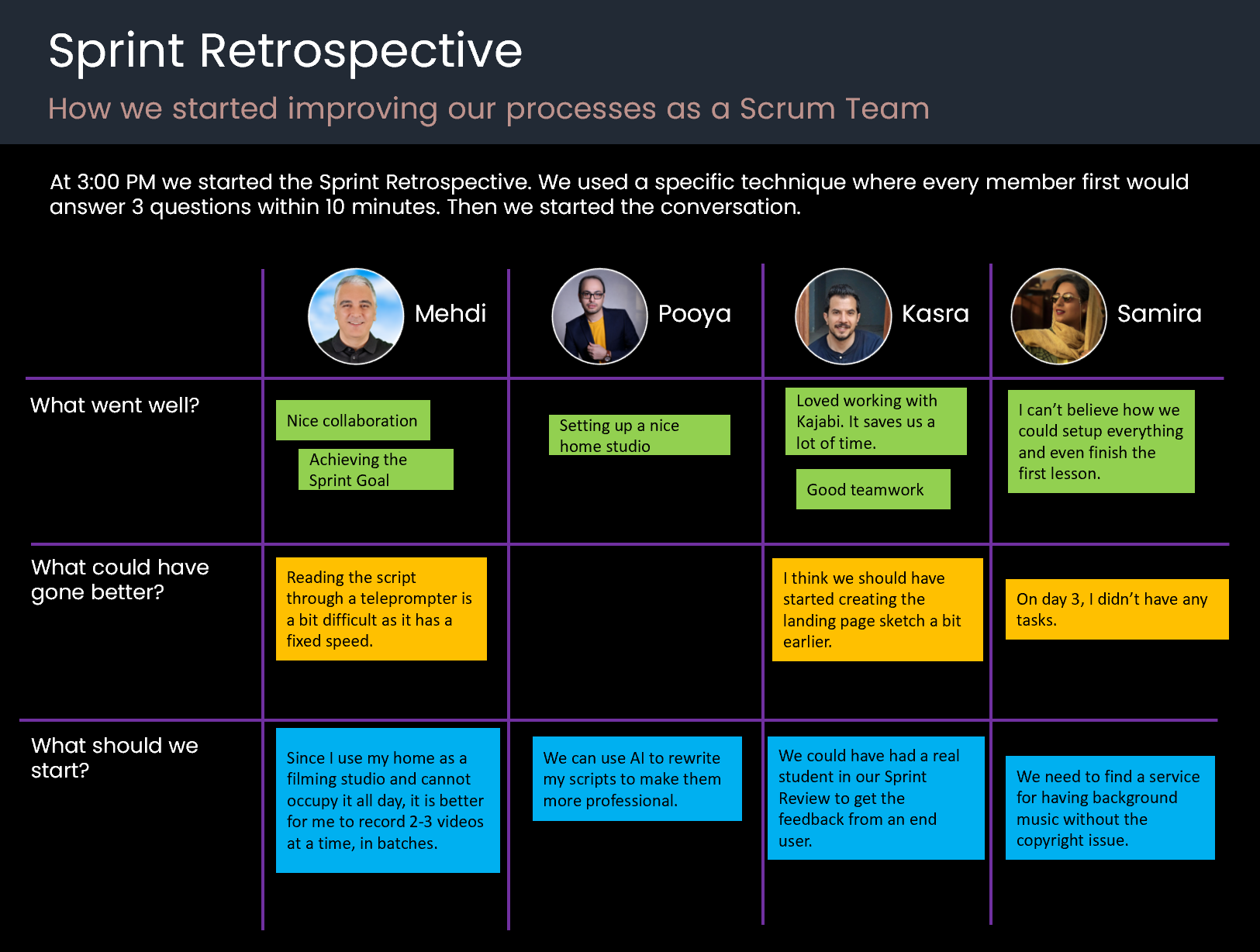
At 3:00 PM we started the Sprint Retrospective. We used a specific technique where every member first would answer 3 questions within 10 minutes. Then we started the conversation.
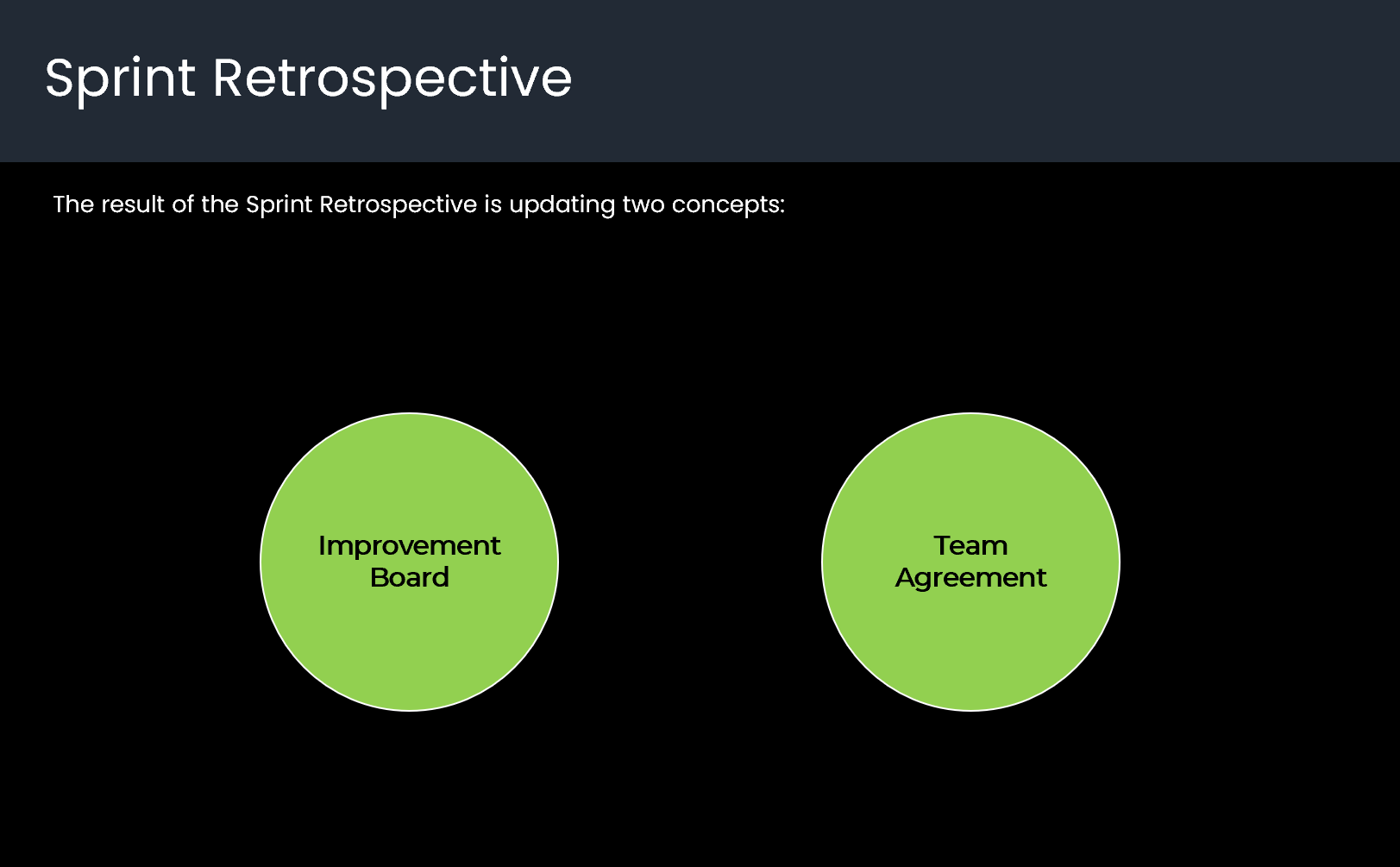
The result of the Sprint Retrospective is updating two concepts:
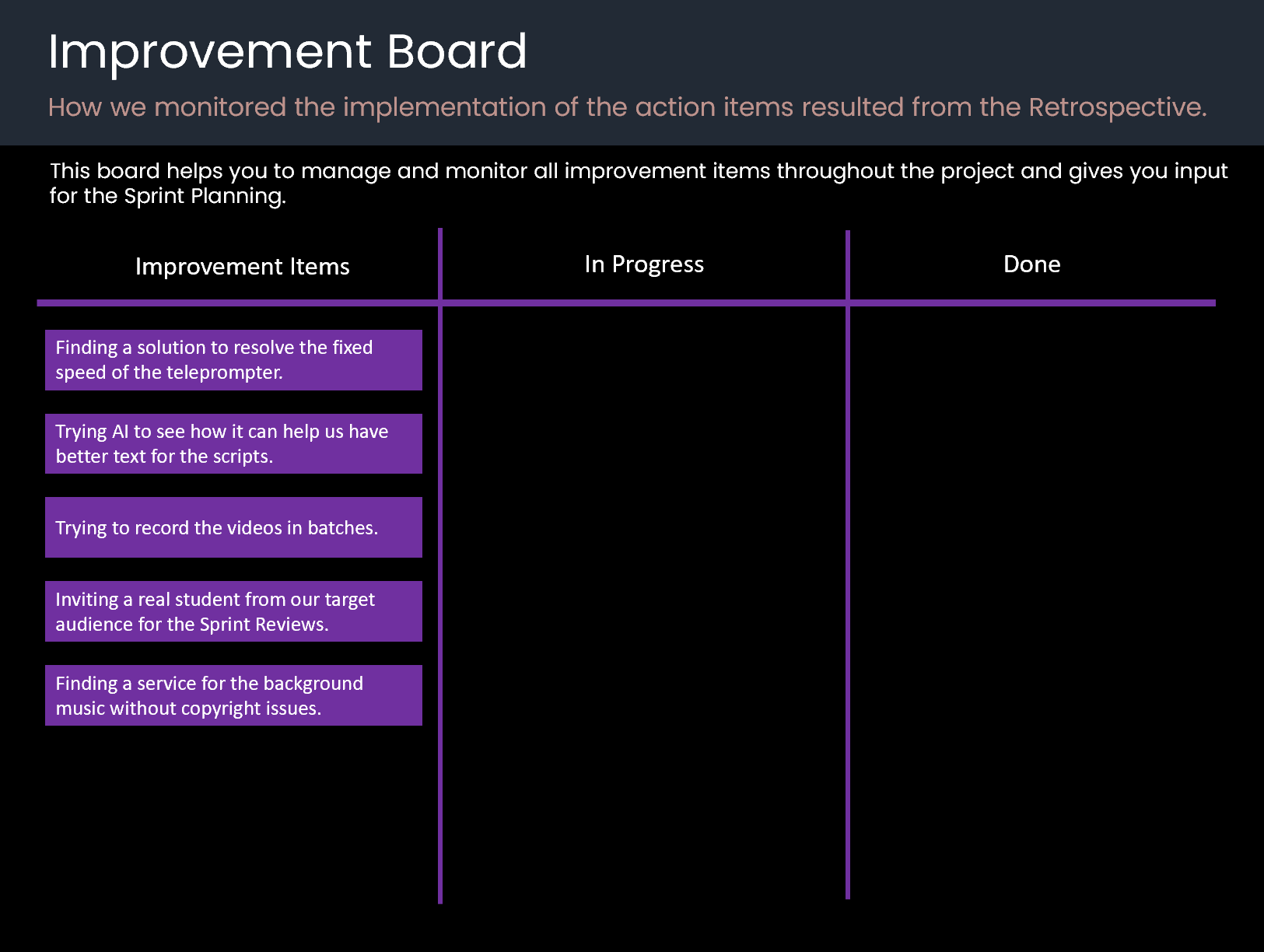
Improvement Board
How we monitored the implementation of the action items resulted from the Retrospective.
This board helps you to manage and monitor all improvement items throughout the project and gives you input for the Sprint Planning.
Updating Team Agreement

We concluded the Sprint with the Retrospective.
We ignored the Daily Scrum of the last day as we didn’t need to inspect the progress toward the Sprint Goal, and it was pointless.
We had everything in place to start a new Sprint next week.
* We used Miro for visualizing all the boards and artifacts. So, what you see here in this document has been drawn again.
* For our daily conversations, we used Telegram.
Sprint 2
Day 1
Sprint Planning
For Sprint 2, we decided to work on creating three lessons and implementing the website section.
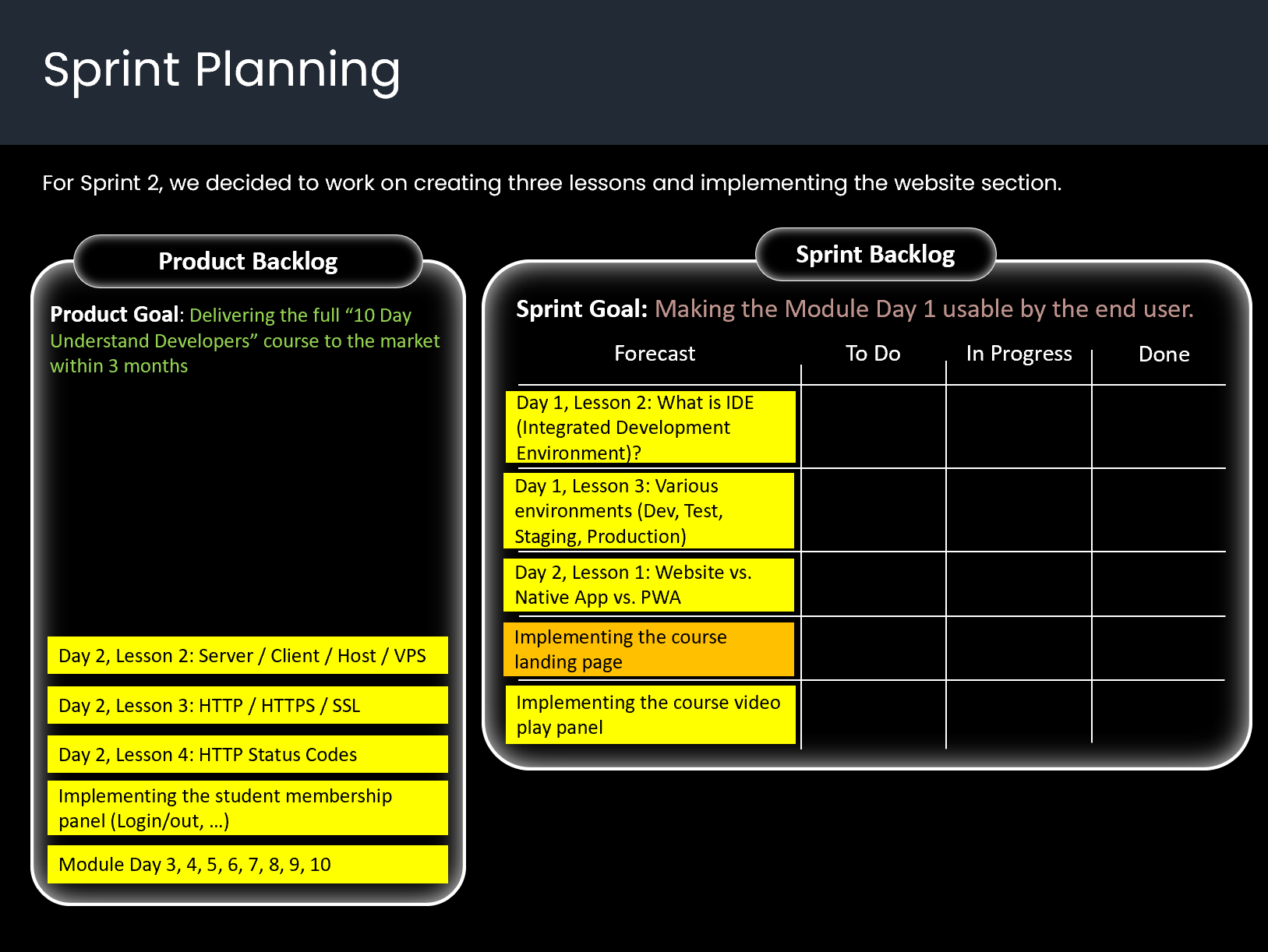
This is the Sprint Backlog at the end of the Sprint Planning.
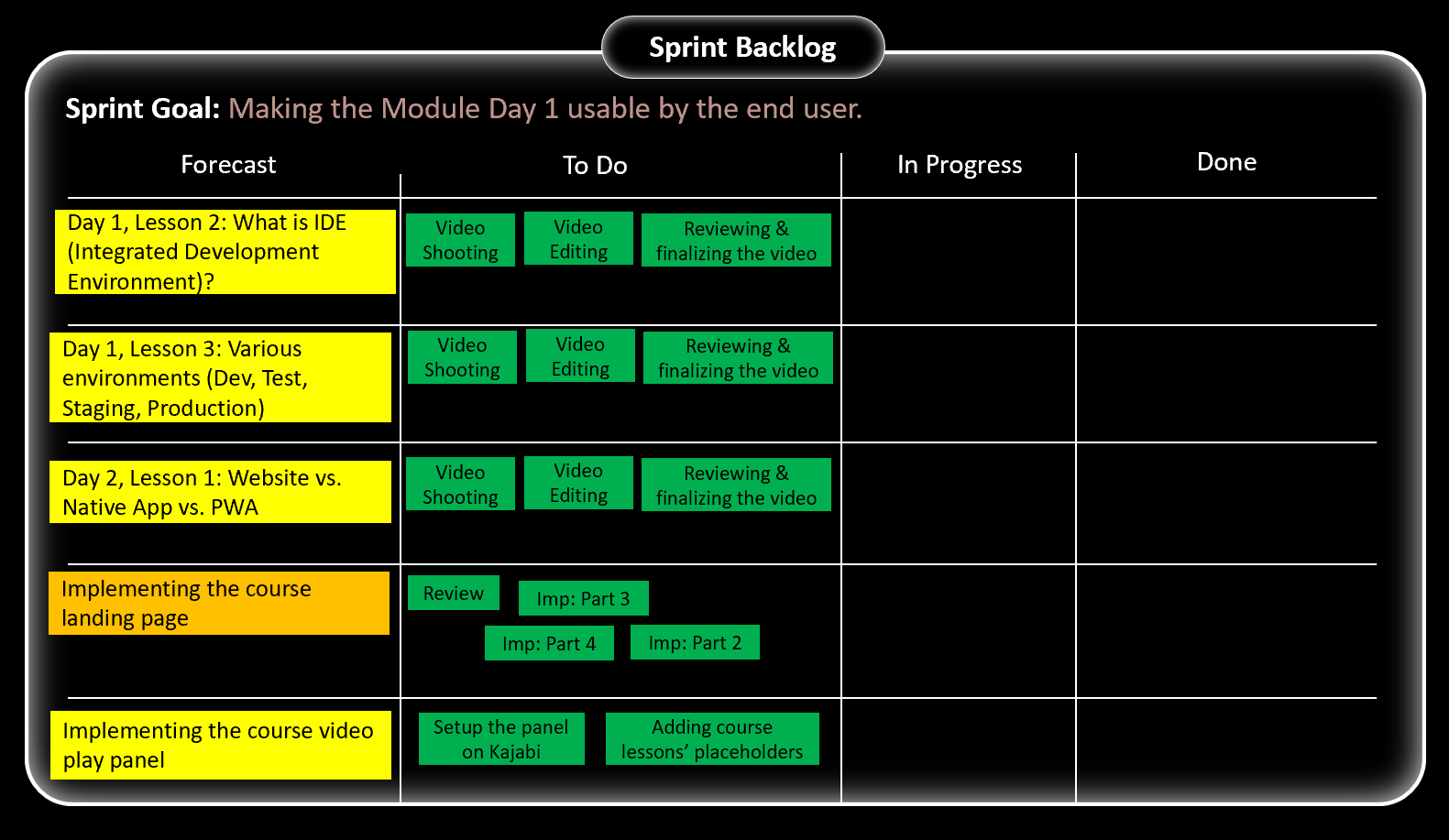
In the Sprint Planning, we also decided to work on 3 improvement items in the current Sprint as follows.

Improvements throughout the project
Delivery Board
We saw that we are recording and editing the videos one-by-one. So, it became difficult to understand which video had only been finalized and which one had also been published to the video play panel. So, we decided to create a Delivery Board to make the status of the videos transparent:

Emergency Work Management
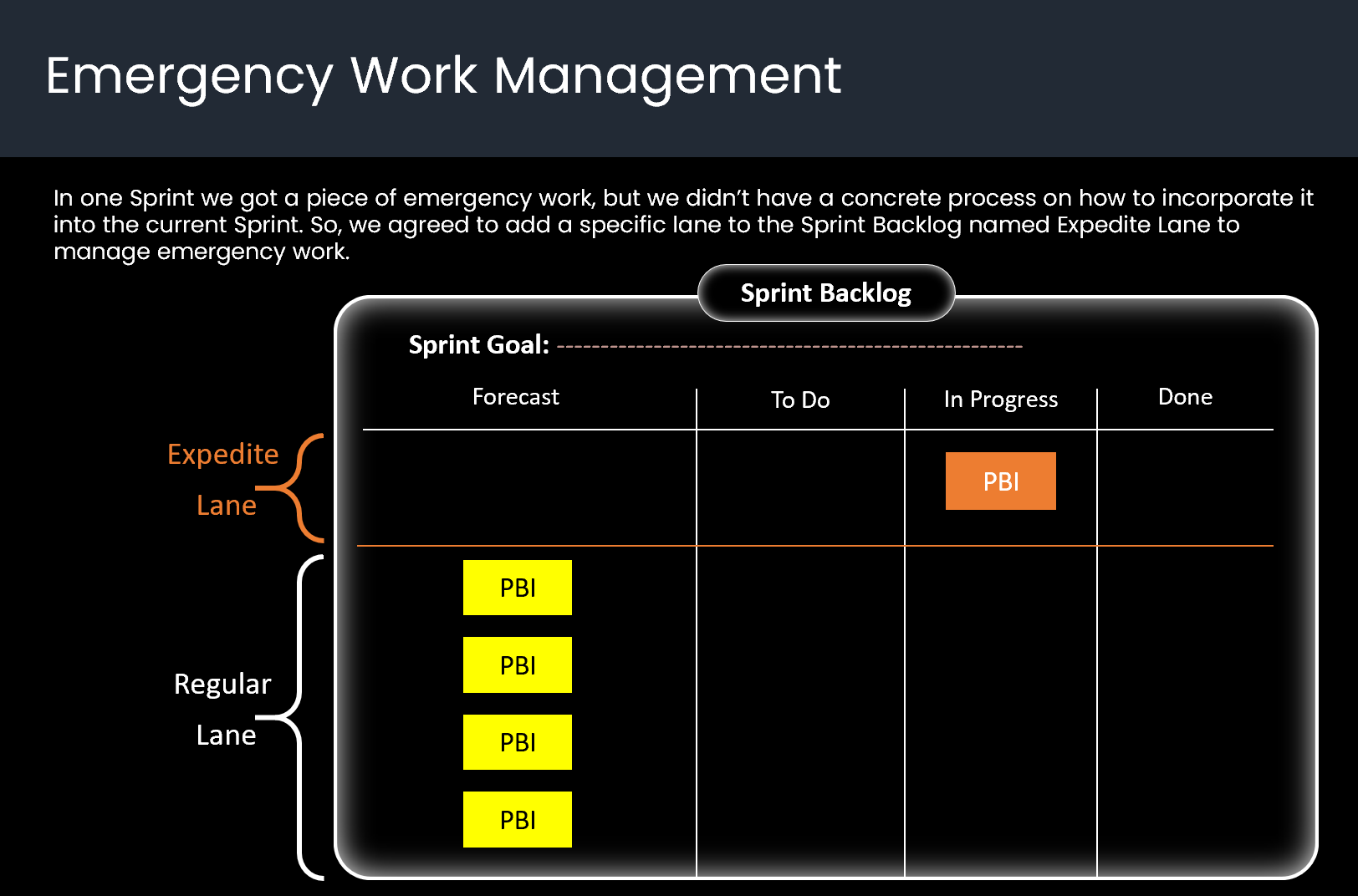
In one Sprint we got a piece of emergency work, but we didn’t have a concrete process on how to incorporate it into the current Sprint. So, we agreed to add a specific lane to the Sprint Backlog named Expedite Lane to manage emergency work.
We defined two rules for the Expedite Lane:
1- All team members are responsible for keeping the lane clear. It means whenever emergency work happens, all members should switch their focus and collaborate to resolve the emergency work as soon as possible.
2- After resolving the emergency work, the team should do a root-cause analysis to understand why it happened.
Acceptance Criteria
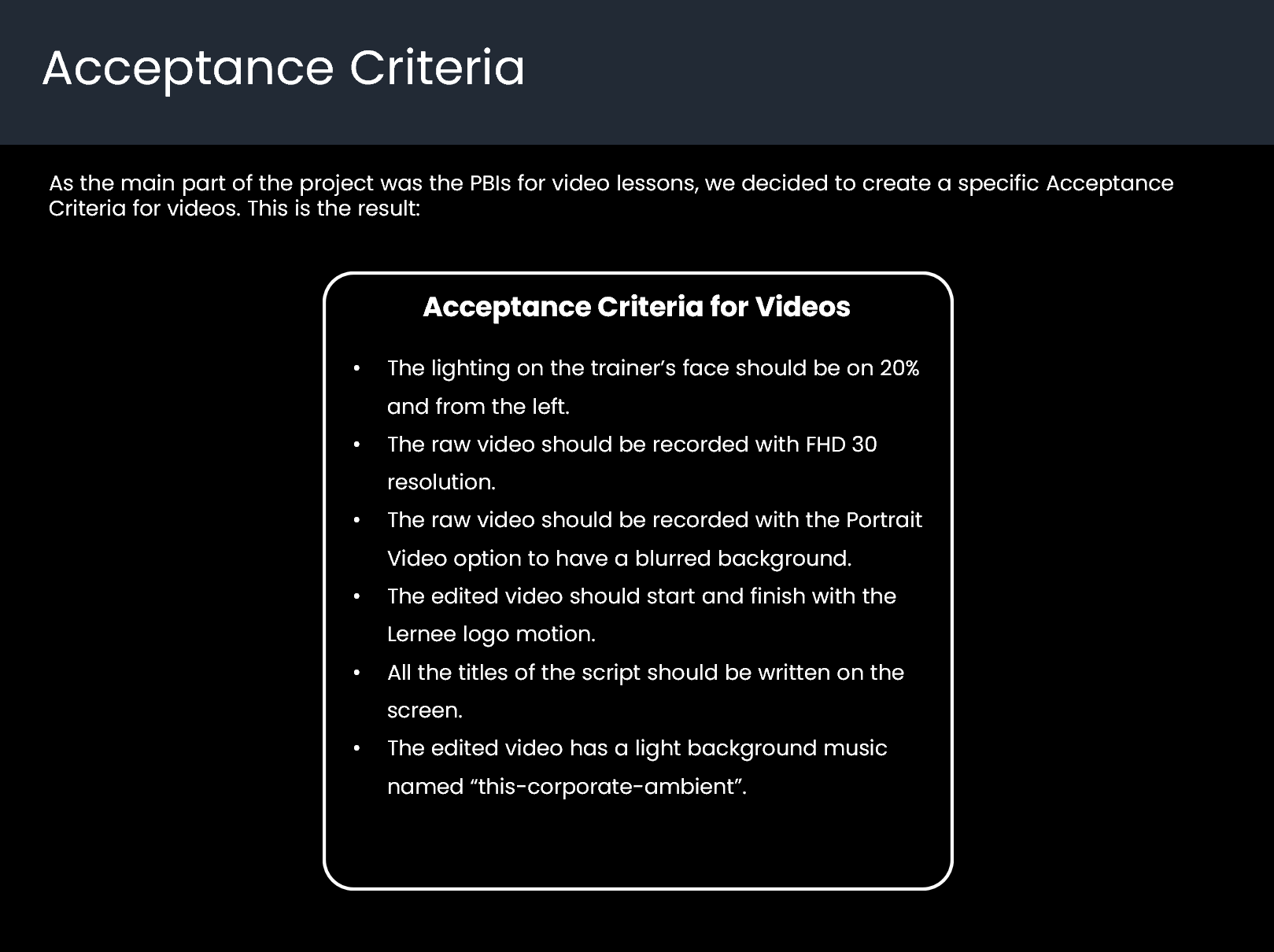
As the main part of the project was the PBIs for video lessons, we decided to create a specific Acceptance Criteria for videos. This is the result:
A Serious Impediment
As we decided to use Kajabi, we set up all things with a lot of effort and integrated it with Stripe, as it was a built-in integrated payment provider in Kajabi. However, after a few days, Stripe sent us an email saying they had banned us.
Inevitably, we changed our platform from Kajabi to Teachable. Interestingly, Teachable was using the Stripe service in the back to process payments. Again, after a few days, we got another email from Stripe with the same topic and banned us.
The worst case was when we asked Stripe to clarify their reasons, they didn’t answer.
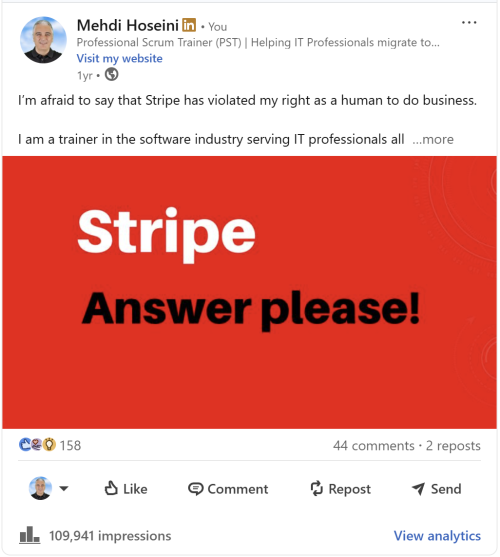
As the last solution, I published a post on LinkedIn and mentioned Stripe.
Interestingly, it worked. They resolved the problem within 48 hours. I couldn’t believe it, but it worked.
You can see my post here and read the complete post by clicking the button.
Click here to read the full post on LinkedIn.
Project Result
Finally, we successfully finished the project within 14 weeks.
We promoted the course through organic marketing and paid advertisements.
Click here to see the course landing page.
Hopefully you enjoyed it :)
Click here to download the full PDF document of the case study.
-------------------------------------------------------------------
Do you plan to become a Scrum Master?
Then, you don't want to miss my Job Switch PSM Package.
I am the only Professional Scrum Trainer (PST) in Europe who exclusively serves IT Professionals seeking an internal job switch within their current company to become a true Scrum Master.
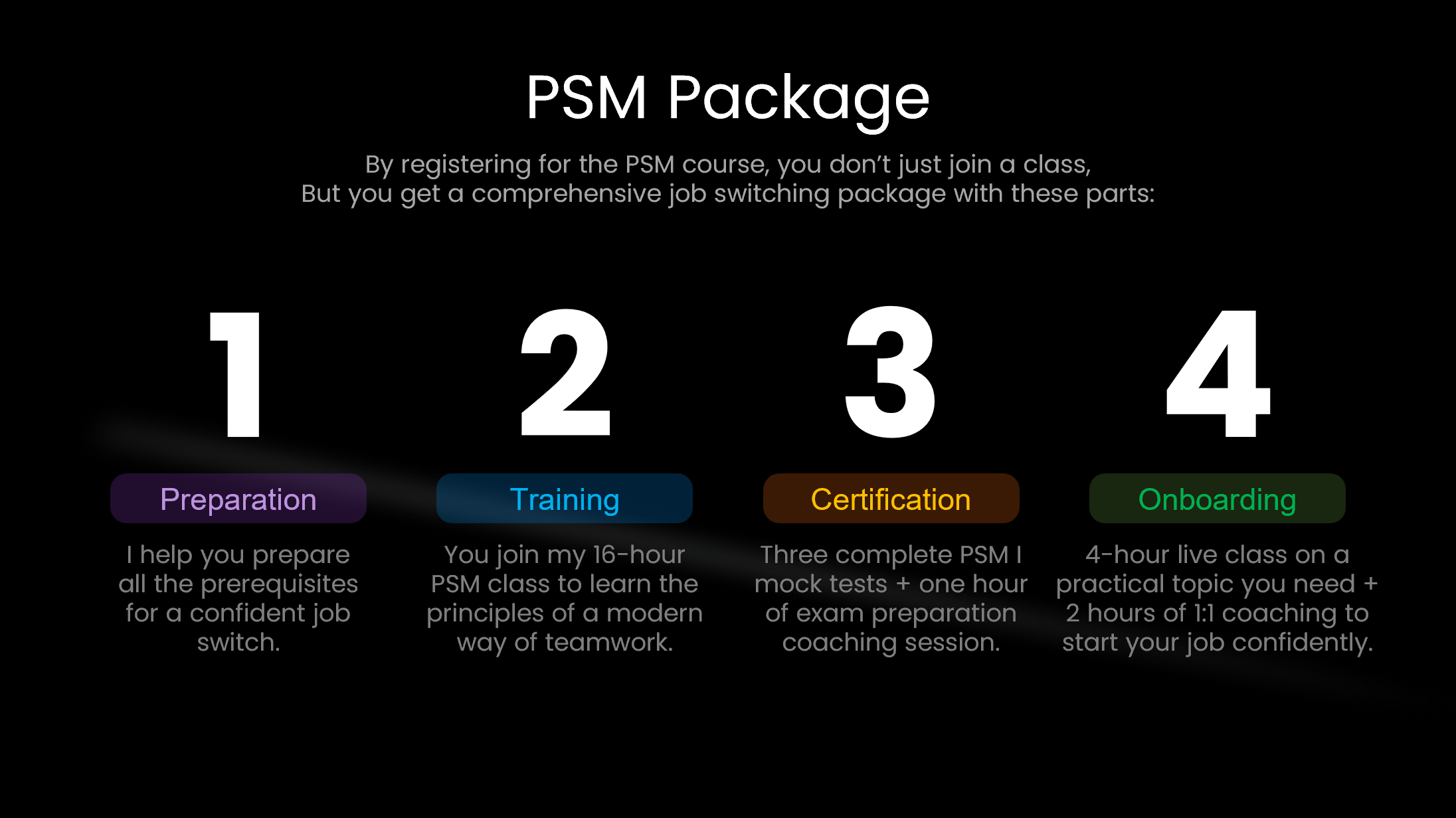
Instead of just giving you a training and leaving, I walk with you step by step throughout your entire career transition. This includes four steps of job switch preparation, PSM training class, earning your PSM I certification, and successful onboarding into your new position.
By registering for my Professional Scrum Master (PSM) class, you will get my Job Switch PSM Package. Click here to get more information about the class and package.